See the cheapest price on every game store page
The free playze.io extension for Chrome and Edge adds a small card to the game page you are already looking at — on Steam, the Epic Games Store, GOG and 35 more stores — showing the lowest price we find across every store we track, the all-time low and whether it is on PC Game Pass.
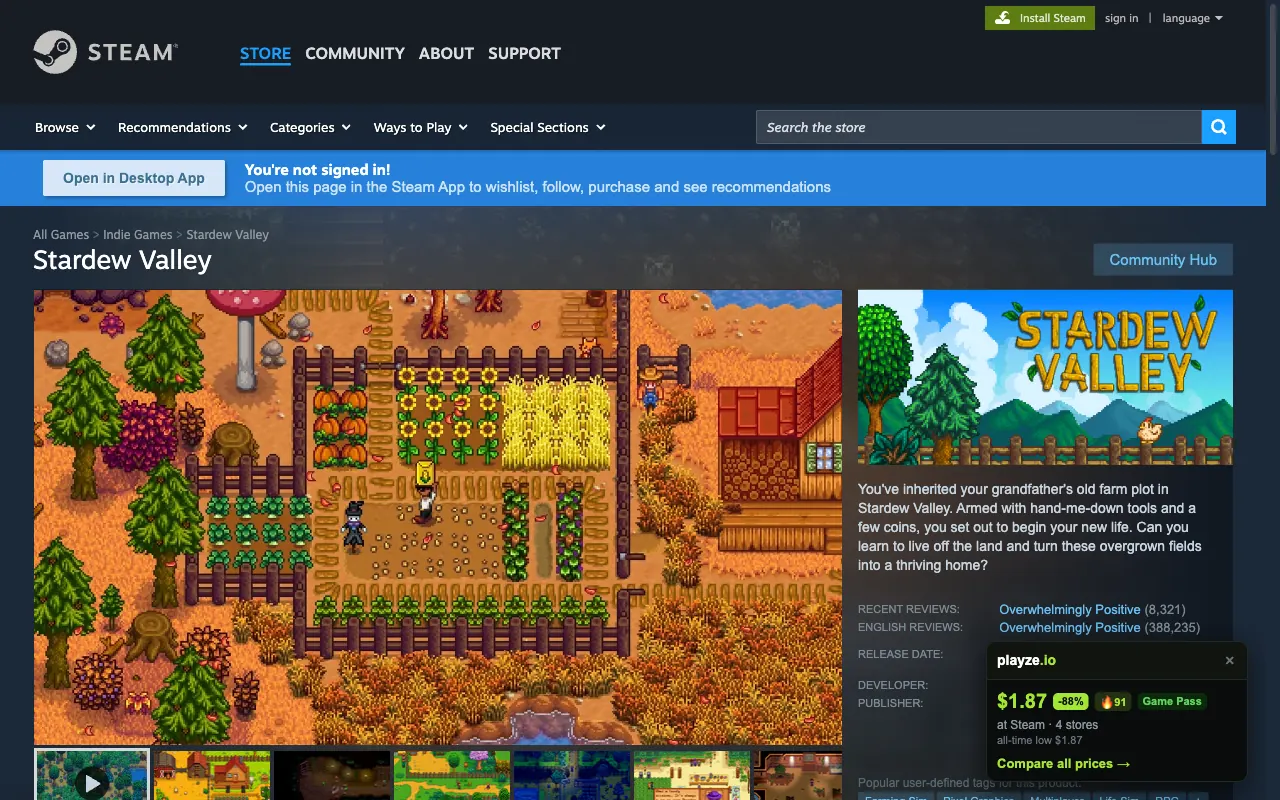
The best price, where you shop
Open a game on any supported store and the card shows the lowest price we found across official stores and trusted keyshops — so you know in a glance whether this shop is the cheap one.
Is this a real deal?
The all-time low and our deal score sit next to today’s price, so a “sale” that is the usual price is easy to spot.
Game Pass check
If the game is on PC Game Pass the card says so, before you pay for something you could already play.
An assistant in the toolbar
Click the icon and ask in plain words — “cheapest Elden Ring”, “co-op games under $20” — and it finds the best price across every store.
Works on 38 stores
- Steam
- Epic Games Store
- GOG
- Humble
- Microsoft Store
- Ubisoft Store
- Battle.net
- Green Man Gaming
- Fanatical
- GamersGate
- IndieGala
- WinGameStore
- GameBillet
- AllYouPlay
- Gamesplanet
- DLGamer
- Nuuvem
- MacGameStore
- Gamesload
- Newegg
- ZOOM Platform
- FireFlower
- Muve
- Kinguin
- G2A
- Eneba
- GAMIVO
- K4G
- CDKeys / Loaded
- Instant Gaming
- Driffle
- Gameseal
- YUPLAY
- PlayerLand
- Playsum
- Keycense
- CJS CD Keys
- Fortuna Digital
What it reads, and what it does not
On a store's game page it reads the game's title (on Steam, the app ID in the address) and asks playze.io for the price. The assistant sends only what you type. No account, no tracking, no browsing history, nothing sold or shared. It does nothing on any other page.
Some store links are affiliate links, so playze.io may earn a commission at no extra cost to you. It never changes the price you pay or which deal we show.
Questions
Is it free?
Yes, completely. No account, no paid tier.
Which browsers?
Chrome, Microsoft Edge, Brave and Opera on desktop. Firefox and Safari are not supported yet, and browsers on phones cannot install extensions.
Does it slow down store pages?
No. It makes one small request for the game you are viewing, after the page has loaded, and draws a single card. On pages that are not a game’s page it does nothing.
Why does a game sometimes show no card?
If we cannot match the store’s title to exactly one game, the card stays hidden — showing another game’s price would be worse than showing nothing.