
GravitreX Arcade
Martin Hjerne · March 3, 2021 · Local Co-Op, Physics, 2D, Co-op, 1980s
Buy GravitreX Arcade from Steam at $7.99 — the cheapest of 1 store we compare.
 Buy at Steam
 Where to buy GravitreX Arcade — official stores
GravitreX Arcade price by region
GravitreX Arcade costs £0.42 in the United Kingdom, €0.47 in Europe (EUR), zł2.60 in Poland, $7.99 in the United States, $7.99 in Georgia (USD), CA$10.50 in Canada, A$11.50 in Australia, NZ$11.50 in New Zealand and R$26.50 in Brazil right now.
| Region | Best price | Official store | Key shop | Stores |
|---|---|---|---|---|
 United Kingdom United Kingdom | £0.42 −94% | £6.50 | £0.42 | 2 |
 Europe (EUR) Europe (EUR) | €0.47 −94% | €7.50 | €0.47 | 2 |
 Poland Poland | zł2.60 −93% | zł37.00 | zł2.60 | 2 |
 United Statesyour region United Statesyour region | $7.99 | $7.99 | — | 1 |
 Georgia (USD) Georgia (USD) | $7.99 | $7.99 | — | 1 |
 Canada Canada | CA$10.50 | CA$10.50 | — | 1 |
 Australia Australia | A$11.50 | A$11.50 | — | 1 |
 New Zealand New Zealand | NZ$11.50 | NZ$11.50 | — | 1 |
 Brazil Brazil | R$26.50 | R$26.50 | — | 1 |
Each row is a real price from that region's own stores, not a currency conversion, so the figures are not directly comparable. Switch regions in the header to shop the one you buy in.
Screenshots
About GravitreX Arcade
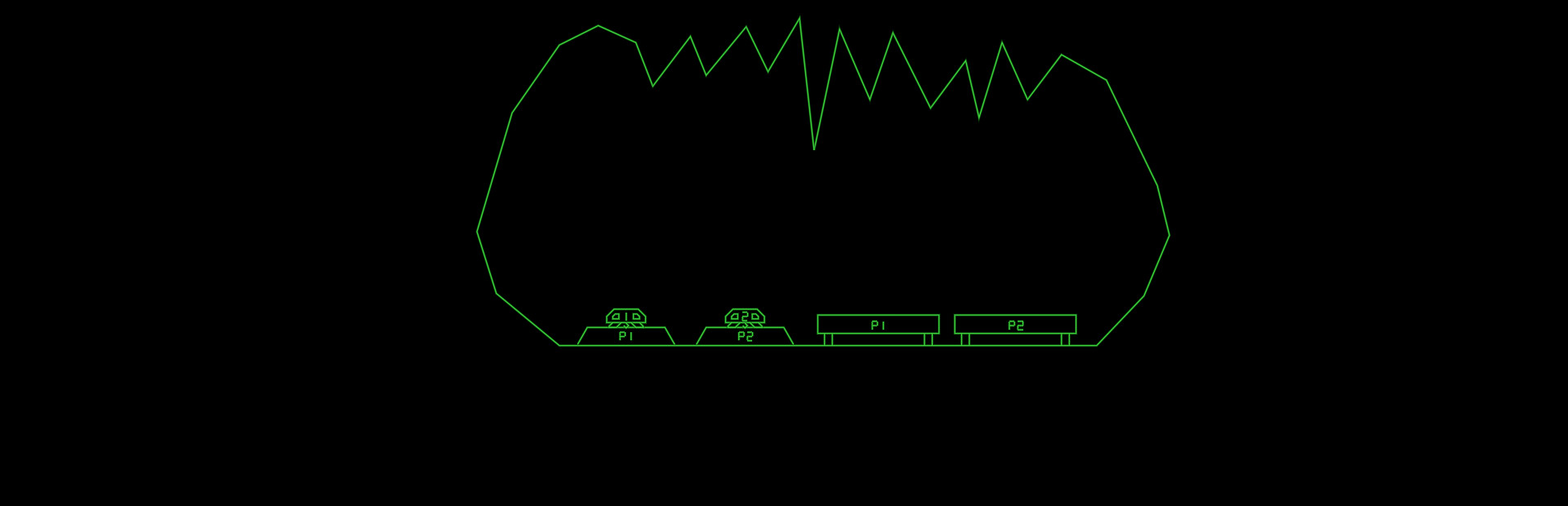
This 2D physics simulation has you trying to land two ships on their respective platform. Like the old classic Lunar Lander, but much more difficult and more heavily physics based.
Features:
- Two ships to land, even in singleplayer
- Ships are equipped with a grabber which can be used to lift boxes or other ships
- Ships are also equipped with an AutoHover System which can be activated by holding down the Switch Ships button (B)
- Ships have lots of systems that can be damaged
- When damaged, a classic synthetic voice will say what systems are damaged
- The voice warnings can be acknowledged (muted) by pressing a button
- As this is the Arcade version, every play you will start on level one
- Extra ships are awarded every 30k points
- 35 levels of increasing difficulty. We are not kidding on this one.
- Perfect for Arcade Cabinets, can even be set up to accept coins (See 'If you happen to have an arcade cabinet' section below)
- Steam achievements
- Classic arcade style highscore with initials, with online entries from your Steam friends (All-time), and Global (Today).
- The first five players to beat the game will make it onto the "Prime Five" list on the web page
Controls:
XBox 360 Controller:
Bumpers = Thrusters
(A) = Grabber
(B) = Switch Ships / AutoHover (hold)
(X) = Acknowledge warnings (until something else breaks!)
(Y) = Self Destruct
Keyboard:
Left/Right Control = Thrusters
Left Shift = Grabber
Right Shift = Switch Ships / AutoHover (hold)
TAB = Acknowledge warnings (until something else breaks!)
X = Self Destruct
P2 keyboard controls:
F/H = Thrusters
R = Grabber
U = Switch Ships / AutoHover (hold)
E = Acknowledge warnings
I = Self Destruct
Note: Playing two players on one keyboard will likely be crowded, these are more meant to be mapped to from an I-PAC or similar arcade button to keyboard key converter.
Whoever first starts the game will become Player 1. Whoever next pushes a control will become Player 2. If Player 1 has switched ships Player 2 will control Ship 1 only until the end of the level. Starting next level, Player 1 controls Ship 1.
Tips and tricks:
- A Ship that's been turned upside-down can usually be rescued using the grabber and the other ship. Don't immediately Self Destruct!
- Firing both thrusters simultaneously will stop the ship's rotation. If the ship is rotating to the right and you press both thrusters, only the right thruster will fire first, until the rotation has stopped. Unless, of course, the stabilizing system on that side is damaged.
- If both ships are destroyed at the same time, the level will be reset. Sometimes you will need to reset a level by self destructing both ships. If one ship is destroyed and you realize the level will need to be reset, Self Destruct the other ship quickly before it respawns, otherwise it will cost an additional life!
If you happen to have an arcade cabinet
This only applies to cabinets with a PC inside of them of course. In the Options screen you will find an option that may interest you:
Coin Handling:
- None: This is the normal PC setting. There is no concept of coins, and players can jump in from any controller
- Freeplay: No coins needed to play, just press 1P or 2P start.
- Internal: This is the normal Cabinet setting. Inserting coins increases the credits ('5' on the keyboard or Select on the controller).
- External: This is if you have an external coin mechanism with its own credit counter. It should send keypresses to tell the game the credits situation: '0' for No credits ('INSERT COIN' will be displayed), '8' for 1 credit ('Press 1P Start' will be displayed), or '9' for Multiple credits ('Press 1P or 2P Start' will be displayed). Also, Multiple Credits can be pressed again and again to play the coin inserted sound effect.
In all coin modes except 'None', pressing 1P start ('1' on the keyboard, or Start on Controller 1) will start a 1P game and P1 then controls the game either from keyboard or controller 1. Pressing 2P Start will start a 2P game, with P2 controlling Ship 2 from P2 keyboard controls or controller 2. In the 'None' mode, pressing any input on any controller will start a game with P1 controlling the game from that controller, and the second controller to receive a button press will join as P2.
If you have a cabinet with default Mame key assignments, replace the "KeyMap.cfg" file with the "KeyMap_MAME.cfg" file. If you have different keys assigned, edit the file and adjust accordingly. Because many cabinets only have three buttons, in this config the stick is used for three of the buttons. Left=Mute, Down=Self Destruct and Right=Switch ships/Autohover. Feel free to change these if you have more buttons and want to use them.
Most arcade frontends can be tricked into launching PC games, usually by creating a dummy "Emulator" called PC, and maybe a dummy file as the "rom". This way GravitreX can coexist with all your other arcade games! If your cabinet does not have internet access, set Highscores to local in the options, and it will save highscores locally to a file instead (local highscores can also be selected from the options menu).
If you have a cabinet (or plan to build one), and want to put it somewhere public and actually charge real money from people, get in touch with us about getting a commercial license and a customized non-steam version of the game.
GravitreX Arcade — game info
- Platforms
- Windows, macOS, Linux / SteamOS
- Player modes
- Single-player, Co-op, Split screen
- Controller
- Full controller support
- PC Game Pass
- Not included
What Steam players say
Recent verbatim reviews from Steam — separate from playze.io community reviews below.
GravitreX Arcade is, well, I'm loathe to call this a ripoff of Moon Lander, but it's not far off in terms of game concept. You have a lunar lander and must battle the controls and physics to move it around (and sometimes use the grappling hook) and land it where it has to go. So this is a game concept that's been done before. It's nice to see a little more depth in the control scheme and the addition of a grappler adds another dimension to the game, as does the co-op feature, that, looking at the game player counts, never got used. Stapling some bells and whistles onto a 1970's/1980's era arcade game doesn't result in a shining, best-of-breed PC gaming experience, and this game is riddled with technical deficiencies and shortcomings. One important note is that even though this is an amateur project, it does seem to be sincerely and genuinely made. I couldn't find any flipped assets, plagiarism or any other kind of insincere actions from the developer, but unfortunately genuine intentions alone are not enough to produce a brilliant PC gaming experience. From a technical perspective, the game doesn't meet basic minimum requirements that most PC gamers expect as standard. The…3 found this helpful
This game is extremely frustrating. You have a limited number of "lives" to try to solve puzzles and execute *very* delicate maneuvers. The slightest mistake leaves your ship's thrusters damaged, making it *even harder*. When you lose all your lives, you have to go all the way back to level 1! So you'll get to a challenging level, lose all your lives, have to start over and spend the next 10 minutes getting through all the earlier levels (assuming you survive them) *just to get another crack* at the hard one where you'll just lose your few remaining lives again and have to go right back to level 1.2 found this helpful
LITTERALLY IMPOSSIBLE WASTE OF MONEY1 found this helpful
You have two ships that you have to move from one platform to another. You can only control one ship at a time but thanks to the grappling hook and auto-hover, they can interact with each other in a bunch of really interesting ways. I haven't finished the game yet (I died at the last level... twice) but I did see all the levels. Some of them are quite frustrating and feel a bit cheap but overall I really like the game. I'm definitely going to try to finish it. [strike]*I am also #1 on the single player leaderboards now. Take that STU.[/strike] [strike]not anymore :([/strike] Yes anymore!1 found this helpful
This is game is highly underrated! It has a simple idea but it's very well done. It's a real arcade game, so it preserves all the arcade aesthetic but it also plays well on PC. I found it easier to play with a controller, the keyboard set up is a bit unusual. The physics are well done, and I like how ships receive different kind of damage depending on the collision. The levels are fun and challenging - it's very easy to send your ship in a spin! - and I like the effects in the game, they fit the style.
So happy this came to steam, I really miss the arcade machines out in AZ
Community reviews
0 reviews
Sign in to write a review.
No reviews yet. Be the first to review this game.
More like GravitreX Arcade


News
 Xbox
XboxMinecraft Dungeons 2 Deluxe Edition: skip it, play on Game Pass
The Minecraft Dungeons 2 Deluxe Edition asks you to pre-order two unannounced DLC packs for a game Game Pass already gives you. What it contains, and why the upgrade can wait.
Sep 30, 2026 PC
PCIs DayZ worth it? A straight answer before you buy
Is DayZ worth it? Twelve years on it is still the genre's least forgiving game. What you are buying, who it suits, and what our 97-day price record says about the timing.
Sep 30, 2026 PC
PCTransport Fever 3 price: which edition to buy on launch day
Transport Fever 3 is out today. The Transport Fever 3 price splits three ways, the loyalty discount has a fortnight-long fuse, and our record shows what the older game really costs.
Sep 29, 2026 PC
PCNo Man's Sky price: how low it gets and when to buy
The No Man's Sky price has come a long way down since 2016, and the game is on PC Game Pass too. Our tracked 12-month low, the regional key gap, and what to actually pay.
Sep 29, 2026 Deals
DealsSekiro cheap: what our price record shows, and what to avoid
Search Sekiro cheap and the results are keyshop listings, not a store discount. Our three-month price record explains the gap, and why so few live offers changes the advice.
Sep 28, 2026 Freebies
System Shock 2 Remaster free on Epic from 1 October
System Shock 2 Remaster free on Epic from 1 to 8 October, alongside BURIED STARS. Our price record shows why its floor has not moved in three months, and why waiting beats buying this week.
Sep 28, 2026 PC
PCDead Island 2 cheap: which edition, and what the price does
Dead Island 2 cheap used to mean under a dollar. Our price record shows the floor has roughly doubled since September - here is which edition to buy, and the one that is a trap.
Sep 27, 2026 Deals
DealsSteam Autumn Sale 2026: the games that cannot be discounted
The Steam Autumn Sale 2026 runs 1-8 October, but Valve's own rules bar every September release from it. Which games are locked out, and what our record says about the two biggest.
Sep 27, 2026 PC
PCTekken 8 ღირს თუ არა: 91 ქულა და შერეული შეფასება
Tekken 8 ღირს თუ არა, როცა კრიტიკოსებს 91 ქულა აქვთ დაწერილი, მოთამაშეებს კი „შერეული"? ფასი, ონლაინის მდგომარეობა და უკეთესი ალტერნატივა.
Sep 24, 2026 Deals
DealsStellaris იაფად: ოცდახუთი დამატება და ერთი გამოსავალი
Stellaris იაფად ყიდვა საბაზისო თამაშის შემთხვევაში მარტივია. ძვირი დამატებებია — და მათთვის არსებობს ვარიანტი, რომელსაც ბევრი ვერ ამჩნევს.
Sep 24, 2026 PC
PCARK ფასი: Evolved თუ Ascended — რომელი ვიყიდოთ
ARK ფასი ორი სხვადასხვა თამაშის ფასია. რომელი ჯობია ქართული სიიდან, სად არიან მოთამაშეები და რატომ არ ღირს ახალ ვერსიაზე გადახტომა.
Sep 24, 2026 Deals
DealsCivilization 6 იაფად: რომელი დამატება ღირს მართლა
Civilization 6 იაფად ყიდვა მარტივია — საბაზისო თამაში იაფია და იაფად რჩება. რთული ის არის, რომ ცხრამეტი დამატებიდან სწორი აირჩიოთ.
Sep 24, 2026 Freebies
CS2 უფასოდ: რა ღირს სინამდვილეში Prime
CS2 უფასოდ ითამაშება საქართველოდანაც და ეს დემო არაა. ფული მხოლოდ Prime-ს სჭირდება — აი, რას იძლევა ის და ვის ღირს.
Sep 24, 2026 PC
PCCuphead ღირს თუ არა: სირთულე, DLC და ორზე თამაში
Cuphead ღირს თუ არა: ექვსივე ქართულ მაღაზიაში ერთი ფასია, მეგობარს კი ასლი საერთოდ არ სჭირდება. სირთულე, ერთადერთი დამატება და როდის ვიყიდოთ.
Sep 23, 2026 Deals
DealsRimWorld იაფად: ბაზა, ხუთი დამატება და სწორი რიგი
RimWorld იაფად ყიდვა დამატებების რიგზეა დამოკიდებული, არა ფასდაკლების ლოდინზე. რომელი ხუთიდან ღირს ჯერ და რომელ მაღაზიას აქვს ფასდაკლება.
Sep 23, 2026 PC
PCPhasmophobia ფასი: ოთხი ასლი და ერთი მაღაზია
Phasmophobia ფასი ქართულ სიაში მხოლოდ ერთ მაღაზიაში ჩანს, თამაში კი ოთხზეა გათვლილი. რატომ ღირს ფასდაკლების დალოდება და რა გჭირდებათ დასაწყებად.
Sep 23, 2026Top games right now
All rankings →- 1Counter-Strike 2Free
- 2Dota 2Free
- 3PUBG: BATTLEGROUNDSFree
- 4Grand Theft Auto V Legacy—
- 5Terraria$2.20
- 6Rust$25.98
- 7Team Fortress 2Free
- 8Black Myth: Wukong$35.70
- 9HELLDIVERS™ 2$30.92
- 10ELDEN RING$52.89
- 11Apex Legends™Free
- 12Left 4 Dead 2$9.99
- 13Stardew Valley$14.99
- 14Wallpaper Engine$3.99
- 15Euro Truck Simulator 2$4.99
- 16Dead by Daylight$7.20
- 17Red Dead Redemption 2$12.72
- 18Baldur's Gate 3$41.99
- 19Phasmophobia$18.24
- 20War ThunderFree
- 21Call of Duty®—
- 22ARK: Survival Evolved$14.20
- 23Among Us$3.03
- 24The Forest$19.99