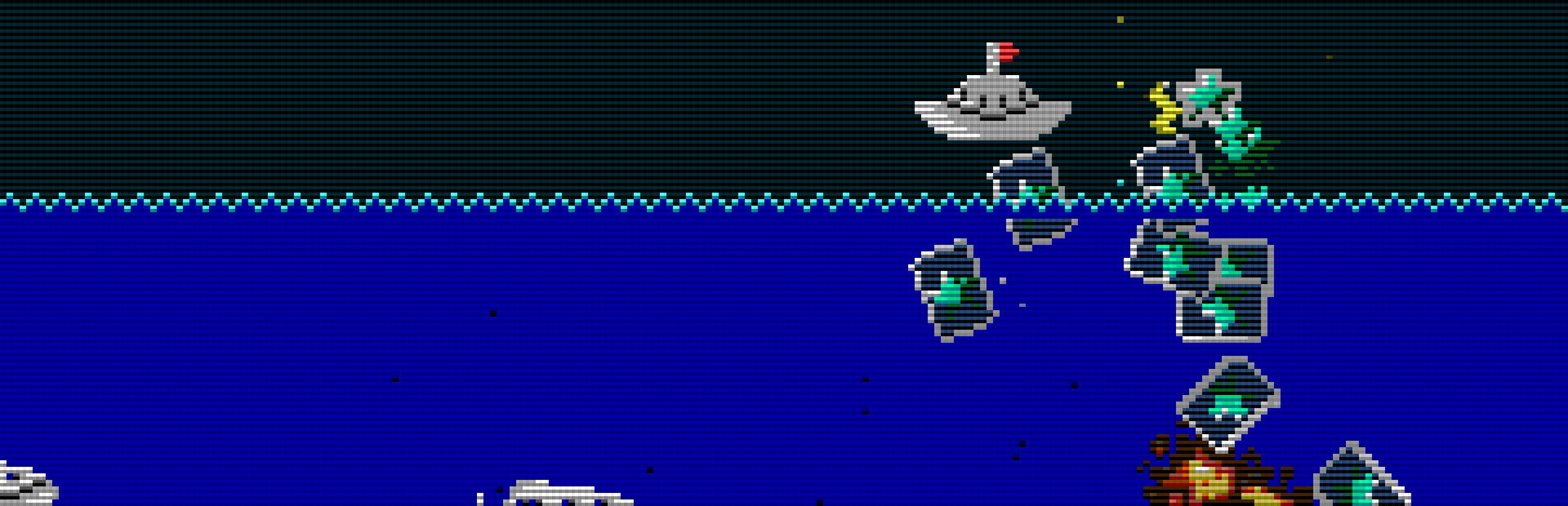

Battle Marine
Yoji Suzuki · February 27, 2024 · Action, Arcade, Shooter, Boomer Shooter, Bullet Hell
Buy Battle Marine from Steam at $4.99 — the cheapest of 1 store we compare.
 Buy at Steam
 Where to buy Battle Marine — official stores
Battle Marine price by region
Battle Marine costs $3.29 in Georgia (USD), £4.59 in the United Kingdom, $4.99 in the United States, €5.19 in Europe (EUR), CA$5.99 in Canada, A$6.95 in Australia, NZ$7.89 in New Zealand, R$19.49 in Brazil and zł21.49 in Poland right now.
| Region | Best price | Official store | Key shop | Stores |
|---|---|---|---|---|
 Georgia (USD) Georgia (USD) | $3.29 | $3.29 | — | 1 |
 United Kingdom United Kingdom | £4.59 | £4.59 | — | 1 |
 United Statesyour region United Statesyour region | $4.99 | $4.99 | — | 1 |
 Europe (EUR) Europe (EUR) | €5.19 | €5.19 | — | 1 |
 Canada Canada | CA$5.99 | CA$5.99 | — | 1 |
 Australia Australia | A$6.95 | A$6.95 | — | 1 |
 New Zealand New Zealand | NZ$7.89 | NZ$7.89 | — | 1 |
 Brazil Brazil | R$19.49 | R$19.49 | — | 1 |
 Poland Poland | zł21.49 | zł21.49 | — | 1 |
Each row is a real price from that region's own stores, not a currency conversion, so the figures are not directly comparable. Switch regions in the header to shop the one you buy in.
Screenshots
About Battle Marine
Overview
Battle Marine is a simple naval barrage STG.Enjoy a somewhat retro yet new and exhilarating game experience by firing a barrage of shots, inducing explosions, sweeping with powerful lasers, and automatically collecting medals (recovery and score) by jumping.
Destroying enemies consecutively within a certain time frame will result in a HIT combo. Aim for 999 HITs! Your rank will be assessed according to the results of your play. Aim for the rank of FLEET ADMIRAL!
Controls
Use the cursor keys to move left and right, press X or B to shoot, and A or Y to jump. Press and hold the B button to charge the laser, and release it when the charge is maxed out to fire the laser.
Press A briefly for small jumps and long for large jumps. Button assignments can be freely customized in the SteamInput menu.
Keyboard Controls (Windows)
- Cursor keys: D-Pad (Can be changed in the key configuration)
- X key: A button (Can be changed in the key configuration)
- Z key: B button (Can be changed in the key configuration)
- Space key: START button (Can be changed in the key configuration)
- ESC key: SELECT button (Can be changed in the key configuration)
- CTRL+X: Exit the game (CTRL+Q, CTRL+C also work)
- CTRL+R: Reset
- Alt+Enter: Toggle full screen (CTRL+F also work)
- CTRL+A: Toggle screen aspect mode
- CTRL+L: Toggle scanline filter
- CTRL+S: Screen Resolution Settings
- CTRL+K: Key configuration for the Keyboard
- CTRL+V: Volume control of background music and sound effects
Keyboard Controls (Linux and macOS)
- Cursor keys: D-Pad
- X key: A button
- Z key: B button
- Space key: START button
- ESC key: SELECT button
- Q: Exit the game
- R: Reset
Notes on the Linux and macOS version
- Supported screen displays are for Aspect-Fit only.
- Configuration UI is not exist yet
Configuration for Linux and macOS
When Battle Marine is launched, the config.json file is automatically created.The output path for config.json is as follows:- macOS: ~/Library/Application Support/Steam/userdata/<UserID>/2824990/local/config.json
- Linux: ~/.local/share/Steam/userdata/<UserID>/2824990/local/config.json
- graphic.isFullScreen: true = full screen, false = window mode
- graphic.isScanline: true = with screen effects, false = without screen effects
- gaphic.windowHeight: height of the screen in window mode
- gaphic.windowWidth: width of the screen in window mode
- sound.volumeBgm: Volume of background music (0-100)
- sound.volumeSe: Volume of sound effect (0-100)
- keyboard.a: Key code for A button (jump)
- keyboard.b: key code for B button (fire)
- keyboard.start: key code for START button (pause)
- keyboard.select: key code for SELECT button (n/a)
- keyboard.up: key code for up button
- keyboard.down: key code for down button
- keyboard.left: Key code for left button
- keyboard.right: Key code for right button
- keyboard.reset: Reset button key code
- keyboard.quit: Key code for quit button
Detailed Gameplay
- When you destroy an enemy, a green or yellow medal will appear.
- Taking the green medal will restore your LIFE.
- Your score will increase if you take a yellow medal.
- If you keep defeating enemies within a certain time (120 frames), your combo will increase and medals will be collected automatically when you reach 100 HITs or more.
- Medals are also automatically collected by jumping.
- You are invincible during the laser (after the firing motion is complete).
- Unlike normal STGs, explosions also have hit points.
- If you keep collecting green medals while your LIFE is full, the yellow medal's base points will continue to increase.
- The number of crowns at the bottom of the screen will increase for every 16 green medals you take while your LIFE is full.
- The maximum number of crowns displayed is 30 (480 green medals), but the maximum number of crowns is 4,095 (65,535 green medals).
- When you collide with enemy bullets, your LIFE will be reduced and the number of crowns will be strongly reduced.
- With the exception of some enemies (crabs), yellow medals will appear when enemies are killed by lasers.
- Obtaining a medal also resets the combo duration to 120 frames
About the GBA version
We are giving away a ROM file of the GBA version as a special offer for purchasing the game on Steam.The GBA version ROM file can be found in the Steam client by clicking on the Battle Marine settings (gear icon) and selecting “Browse local files” under “Manage”.The GBA version of the ROM can be played on mGBA or other emulators.Video distribution, etc.
There are no restrictions on the distribution of this game on TV, YouTube, or other video distribution sites.Of course, there are no restrictions on monetization.
There is no need to contact the author prior to or after the event. Similarly, there are no restrictions on publishing screenshots in magazines, web media, social media, etc.
About VGS-Zero
This game is made with the SDK called VGS-Zero.VGS-Zero is a virtual game machine with a fast 16MHz Z80 CPU, old-fashioned VDP (Video Display Processor) and VGS (chip-tuned sound system).
There may be many 8-bit style games, but the games made with VGS-Zero are real 8-bit games.
If you want to develop games like Battle Marine, please try to develop games with VGS-Zero.
Games you develop with VGS-Zero can be sold on Steam (Windows, Linux and macOS) using the VGS-Zero SDK for Steam.
Battle Marine — game info
- Platforms
- Windows, macOS, Linux / SteamOS
- Player modes
- Single-player
- Controller
- Full controller support
- PC Game Pass
- Not included
What Steam players say
Recent verbatim reviews from Steam — separate from playze.io community reviews below.
Battle Marine is a fast-paced retro shoot'em up with engaging, intricate scoring mechanics built around maintaining hit chains and collecting medals, which players find addictively fun despite the game's simple premise. The retro aesthetic, responsive controls, and frantic action are praised, though some feel the core gameplay loop is limited and wish for more depth or variety. Auto-fire configuration is a notable quality-of-life issue that frustrated some players, though mapping the function resolved it.
Battle Marine is a one trick pony. It's not Seawolf from the 1970's. No periscope here. Okay, #1 is the price. You can play Battle Marine for a couple of minutes, and kind of say to yourself, "I'm through with this game". I thought that to myself, and then discovered the jumping mechanic. When you jump, your health comes back to you magnetized. That pretty much saved me from returning the game after exactly 2 minutes. This should have been on the iiRcade when it was in existence. So, if my friends buy Battle Marine, I can see their score, and make it worth playing again. Battle Marine is a one trick pony, but probably a better one trick pony than you imagine it to be. https://steamcommunity.com/groups/indieretrogamers2 found this helpful
Battle Marine is a fun little shoot'em up. Drop bombs or use your laser to destroy enemies, collect medals while avoiding danger from above and below. Increase your multiplier and chain for big scores. To keep your hit chain going you need a successive hit within 2s, without a miss or your ship getting hit. Map "c" to a button for auto-fire. Collect green medals for health or to increase multiplier when at full health and collect yellow medals for points. Using laser only gives yellow medals except when used on crabs.2 found this helpful
Interesting game that i recommend wth some reservations (specially auto-fire button) you are a boat in a 2d plane above water. most of the enemyes appear from the water, but some appear in the sky There are 2 buttons one for shoot other for jump, other for jump. if you hold the fire button for some time you have a charged shot that lasts for a few seconds.if have a energy bar that deplets with enemy bullets Pros - the artstyle may be basic and retro but works well because bullet visibility is great. - The gameplay is retro and at the same time very original and unique - The action is frantic and fun I- nteresting and deep score system that is simple at the same time Cons - There is a lack of auto fire button. I have a madcatz arcade stick so fortunaly i could program a extra buton for fire.. We are at 2025 and it´s beyond compreension why the devs don´t change add a extra button as carpal tunnel is a serious health problem. Personaly if i did not had a joystick board that allowed that i would rate with a negative review. Saw the discussion board and there are complains about that with more than one year. So dev´s are not much interesting in fixing that. - There is a lack of game …1 found this helpful
A fun retro 80's Atari Home Console type game with action and great classic sounds. Works great with Xbox Controller . Brought me back to the 80's ... Good Job Developers!1 found this helpful
Gotta keep that combo going!1 found this helpful
All thrills, no frills. This neat little shooter offers complex scoring mechanics, frantic action, responsive controls, an enjoyable retro feeling and equally enjoyable and equally retro graphics and sound. The fact it runs on a virtual fantasy machine makes it even more noteworthy and interesting. And additional kudos is due for offering a macOS version. It would be great in a full-on arcade cab, which should tell a lot about how good it is.
Community reviews
0 reviews
Sign in to write a review.
No reviews yet. Be the first to review this game.
More like Battle Marine


News
 PC
PCFinal Fantasy XI price: what you pay, then keep paying
The Final Fantasy XI price is two numbers, and the subscription is the one that matters. Our tracked low, what the Ultimate Collection includes, and when buying at list is correct.
Oct 16, 2026 PC
PCCastlevania Belmont's Curse price: which edition to buy
The Castlevania Belmont's Curse price splits in two: Steam charges full list, authorised resellers a quarter less. Our record says that 25% has not moved since June, and is the floor.
Oct 16, 2026 Deals
DealsHogwarts Legacy price history: where the floor really is
Our Hogwarts Legacy price history runs to 100 daily readings and a $3.99 median. Why the sub-dollar figure in search results is noise, and what to actually pay.
Oct 15, 2026 PC
PCEnshrouded price after 1.0: what it costs now
Enshrouded hit 1.0 today, but the Enshrouded price rose on 8 September and the key resellers have not followed. What our nine tracked sellers show, and whether to buy now.
Oct 15, 2026 PC
PCStarfield price history: the sub-$20 window, and who set it
Our Starfield price history shows one reseller set the all-time low over five weeks in late summer 2026. What a good price looks like now, and why Game Pass comes first.
Oct 14, 2026 PC
PCBoltgun 2 price: buy the sequel, or the cheap first game?
The Boltgun 2 price has no cheaper route on launch day — our record shows one listing, unmoved since September. The first game is the bargain, but a smaller one than it was.
Oct 14, 2026 PC
PCRust price: why the cheap keys vanished, and when to buy
The Rust price has two answers: an official one that barely moves, and a reseller one that sat in single digits for 95 days and then disappeared. Our record shows both.
Oct 13, 2026 PC
PCPlanet Zoo 2 price: which edition, and when it gets cheaper
Planet Zoo 2 is out today. The Planet Zoo 2 price splits two ways, the cheap pre-order keys stopped existing three weeks ago, and the original got dearer as the sequel landed.
Oct 13, 2026 PC
PCTekken 8 ღირს თუ არა: 91 ქულა და შერეული შეფასება
Tekken 8 ღირს თუ არა, როცა კრიტიკოსებს 91 ქულა აქვთ დაწერილი, მოთამაშეებს კი „შერეული"? ფასი, ონლაინის მდგომარეობა და უკეთესი ალტერნატივა.
Sep 24, 2026 Deals
DealsStellaris იაფად: ოცდახუთი დამატება და ერთი გამოსავალი
Stellaris იაფად ყიდვა საბაზისო თამაშის შემთხვევაში მარტივია. ძვირი დამატებებია — და მათთვის არსებობს ვარიანტი, რომელსაც ბევრი ვერ ამჩნევს.
Sep 24, 2026 PC
PCARK ფასი: Evolved თუ Ascended — რომელი ვიყიდოთ
ARK ფასი ორი სხვადასხვა თამაშის ფასია. რომელი ჯობია ქართული სიიდან, სად არიან მოთამაშეები და რატომ არ ღირს ახალ ვერსიაზე გადახტომა.
Sep 24, 2026 Deals
DealsCivilization 6 იაფად: რომელი დამატება ღირს მართლა
Civilization 6 იაფად ყიდვა მარტივია — საბაზისო თამაში იაფია და იაფად რჩება. რთული ის არის, რომ ცხრამეტი დამატებიდან სწორი აირჩიოთ.
Sep 24, 2026 Freebies
CS2 უფასოდ: რა ღირს სინამდვილეში Prime
CS2 უფასოდ ითამაშება საქართველოდანაც და ეს დემო არაა. ფული მხოლოდ Prime-ს სჭირდება — აი, რას იძლევა ის და ვის ღირს.
Sep 24, 2026 PC
PCCuphead ღირს თუ არა: სირთულე, DLC და ორზე თამაში
Cuphead ღირს თუ არა: ექვსივე ქართულ მაღაზიაში ერთი ფასია, მეგობარს კი ასლი საერთოდ არ სჭირდება. სირთულე, ერთადერთი დამატება და როდის ვიყიდოთ.
Sep 23, 2026 Deals
DealsRimWorld იაფად: ბაზა, ხუთი დამატება და სწორი რიგი
RimWorld იაფად ყიდვა დამატებების რიგზეა დამოკიდებული, არა ფასდაკლების ლოდინზე. რომელი ხუთიდან ღირს ჯერ და რომელ მაღაზიას აქვს ფასდაკლება.
Sep 23, 2026 PC
PCPhasmophobia ფასი: ოთხი ასლი და ერთი მაღაზია
Phasmophobia ფასი ქართულ სიაში მხოლოდ ერთ მაღაზიაში ჩანს, თამაში კი ოთხზეა გათვლილი. რატომ ღირს ფასდაკლების დალოდება და რა გჭირდებათ დასაწყებად.
Sep 23, 2026Top games right now
All rankings →- 1Counter-Strike 2Free
- 2Dota 2Free
- 3PUBG: BATTLEGROUNDSFree
- 4Grand Theft Auto V Legacy—
- 5Terraria$2.16
- 6Rust$25.81
- 7Team Fortress 2Free
- 8Black Myth: Wukong$36.47
- 9HELLDIVERS™ 2$25.04
- 10ELDEN RING$49.41
- 11Apex Legends™Free
- 12Left 4 Dead 2$9.99
- 13Stardew Valley$13.81
- 14Wallpaper Engine$3.99
- 15Euro Truck Simulator 2$10.20
- 16Dead by Daylight$6.83
- 17Red Dead Redemption 2$11.11
- 18Baldur's Gate 3$57.73
- 19Phasmophobia$17.27
- 20War ThunderFree
- 21Call of Duty®—
- 22ARK: Survival Evolved$13.45
- 23Among Us$2.99
- 24The Forest$19.70