
Slither Link Plus
Vector Game · September 14, 2025 · Casual, Logic, Puzzle, Board Game, Mystery Dungeon
Buy Slither Link Plus from Steam at $1.99 — the cheapest of 1 store we compare.
 Buy at Steam
 Where to buy Slither Link Plus — official stores
Slither Link Plus price by region
Slither Link Plus costs $1.39 in Georgia (USD), £1.79 in the United Kingdom, $1.99 in the United States, €2.09 in Europe (EUR), CA$2.39 in Canada, A$2.80 in Australia, NZ$3.19 in New Zealand, R$7.95 in Brazil and zł8.35 in Poland right now.
| Region | Best price | Official store | Key shop | Stores |
|---|---|---|---|---|
 Georgia (USD) Georgia (USD) | $1.39 | $1.39 | — | 1 |
 United Kingdom United Kingdom | £1.79 | £1.79 | — | 1 |
 United Statesyour region United Statesyour region | $1.99 | $1.99 | — | 1 |
 Europe (EUR) Europe (EUR) | €2.09 | €2.09 | — | 1 |
 Canada Canada | CA$2.39 | CA$2.39 | — | 1 |
 Australia Australia | A$2.80 | A$2.80 | — | 1 |
 New Zealand New Zealand | NZ$3.19 | NZ$3.19 | — | 1 |
 Brazil Brazil | R$7.95 | R$7.95 | — | 1 |
 Poland Poland | zł8.35 | zł8.35 | — | 1 |
Each row is a real price from that region's own stores, not a currency conversion, so the figures are not directly comparable. Switch regions in the header to shop the one you buy in.
Screenshots
About Slither Link Plus
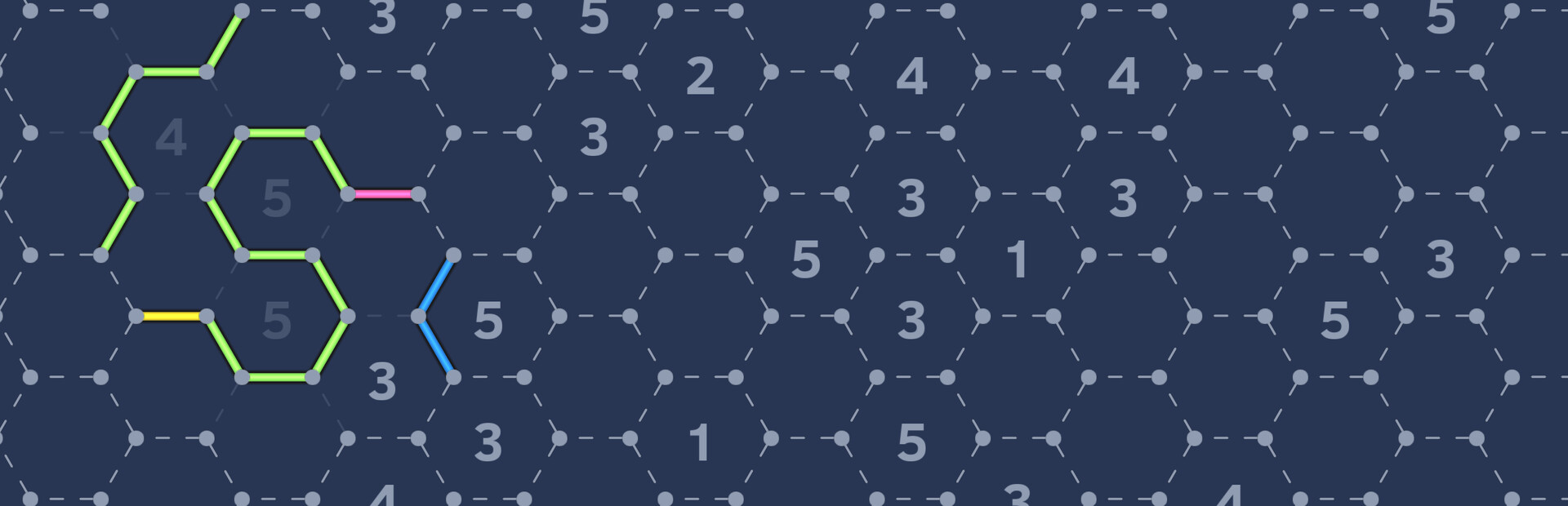
🕹️ Rules:
- On a grid of dots, connect adjacent dots with directional lines to form a closed loop.
- A number in a cell indicates how many of its surrounding edges should be part of the loop. Empty cells may have any number of surrounding lines.
- The loop must not intersect, branch, or split, and only one loop is allowed on the board.
✨ Features:
- In addition to the classic square grid, this version also includes hexagonal, kite-shaped, and Cairo tiling boards — each offering unique logic patterns and solving strategies.
- Includes 5 board types and over 250 + N handcrafted levels, suitable for players of all skill levels — from beginners to puzzle masters.
- Multiple color themes are available to customize your visual experience.
- Achievements system lets you unlock rewards by completing in-game levels.
- A built-in level generator supports all board types and three difficulty settings, providing infinite randomly generated puzzles for endless play anytime.
✨ How to play:
- When you are certain that a line should be placed at a certain position, left-click on that position to place the line. When you are sure that no line should be placed at a certain position, right-click on that position to mark it as having no line.
- If you are unsure about what to do next during the game, you can click on the magnifying glass icon to use the hint function and get guidance for the next move.
- If the hint function doesn't help solve the problem, you can use the assumption function. First, place a line, and then click the flag button. This action will bookmark the previous operation of placing the line. Then continue with the game. If you later find that you can't proceed further, you can long-press the undo button for 2 seconds to directly undo to the bookmarked position, thus eliminating the invalid operation you just made.
🧭 Controls:
Special Button Functions:
- Flag: Click to toggle tab status. Hold for 2 seconds to delete all tabs.
- Super Undo: Hold the undo button for 2 seconds to quickly revert back to the point near your last tab.
- Toggle piano sound: Press and hold the Ctrl key while clicking the speaker button to toggle whether the piano sound is played.
Mouse Operations:
- Drag Map: Hold the middle mouse button, or hold both left and right mouse buttons to drag the map.
- Zoom: Use the mouse scroll wheel to zoom in and out.
Keyboard Shortcuts:
- Undo: \
- Redo: ]
- Flag: P
- Move Map: W / A / S / D
- Zoom: Q / E
Slither Link Plus — game info
- Platforms
- Windows
- Player modes
- Single-player
- PC Game Pass
- Not included
What Steam players say
Recent verbatim reviews from Steam — separate from playze.io community reviews below.
I didn’t expect a puzzle game to become part of my daily routine, but this one is deceptively simple: you just draw a single loop through a grid using only numbers as clues, think Minesweeper. But once you dive in, it’s like unlocking a secret language of spatial reasoning. What really hooked me was the variety of modes. Square grids are the classic warm-up, but then you have Hex, Kite, and even Cairo modes, each with its own twist. It keeps reinventing itself just when you think you’ve mastered it. Some puzzles are simple, others made me question my choices in a good way. There are three modes of difficulty with six-sized layouts just waiting to scratch that itch for clever problem-solving with handcrafted levels and an infinite mode. Truthfully, I lost track of time without realizing it. It's perfect if you just want to zone out and challenge yourself without any pressure. They’ve become a part of my daily routine: just me and a loop waiting to be discovered. So, if you like logic puzzles or just want something to sharpen your mind, then this one is a gem. It’s nothing flashy...just quietly brilliant. [quote]For more puzzle game reviews, news and everything puzzle-related, fol…4 found this helpful
This puzzle game is perfect for short play sessions, something you can enjoy during a coffee break by completing one or two stages at a time. There’s no overarching story or long-term objective; your only goal is to solve all the preset puzzles. While the puzzles must be completed in sequence, there are five different grid shapes available, each with its own set of challenges. If one type of puzzle becomes too tricky, you can easily switch to another grid and continue playing another puzzle. The gameplay mechanics are straightforward. You’re presented with a grid made up of tiles, some of which contain numbers. The default grid is rectangular, but you can choose from four additional shapes for variety. Regardless of the grid, the aim is to draw a continuous line or loop by following the numerical clues. Each number indicates how many edges of that tile must be part of the line. For example, a “0” means no edges should contain a line, while a “3” means three edges must be filled. Tiles without numbers can be used freely and often play a crucial role in connecting sections of the loop. To make progress easier to track, the game automatically grays out a number once its condition ha…2 found this helpful
I stared for over 200 hours on a static screen filled with nothing but colored lines and numbers, and I seriously wondered why I could not tear myself away from it. The thrilling joy of completing a level, the terrifying realisation that you made a mistake an hour earlier and had to redo the whole thing - I am glad I experienced both, but I am also glad that I can finally leave it behind and, you know, play other games, or live, I guess. Great game, but maybe not the healthiest for people with obsessive tendencies.1 found this helpful
It's even better than the previous one. I essentially 100%ed the game. But, my save, again, was corrupted. This wiped out my progress before I got the last two achievements, including the achievement for finishing all levels. So, even though I was still able to get all other completion achievements, because the last one was finished after the save wipe, the 100% achievement did not detect my having full completion. And, I don't want to go through the trouble of playing almost the whole game over again, just for that one achievement.
I played this game almost a hundred hours, so it is well worth playing. However, I uninstalled it as the later puzzles are too difficult and somewhat buggy, in that your lines disappear eliminating your options to go another route. Although the games was fun and a good brain challenge, it simply became too stressful for me. If more players take interest and someone creates a guide, I would gladly reinstall and try this again. The dev is very quick to help when needed, and I wish him all the best with this game.
Community reviews
0 reviews
Sign in to write a review.
No reviews yet. Be the first to review this game.
More like Slither Link Plus


News
 PC
PCFinal Fantasy XI price: what you pay, then keep paying
The Final Fantasy XI price is two numbers, and the subscription is the one that matters. Our tracked low, what the Ultimate Collection includes, and when buying at list is correct.
Oct 16, 2026 PC
PCCastlevania Belmont's Curse price: which edition to buy
The Castlevania Belmont's Curse price splits in two: Steam charges full list, authorised resellers a quarter less. Our record says that 25% has not moved since June, and is the floor.
Oct 16, 2026 Deals
DealsHogwarts Legacy price history: where the floor really is
Our Hogwarts Legacy price history runs to 100 daily readings and a $3.99 median. Why the sub-dollar figure in search results is noise, and what to actually pay.
Oct 15, 2026 PC
PCEnshrouded price after 1.0: what it costs now
Enshrouded hit 1.0 today, but the Enshrouded price rose on 8 September and the key resellers have not followed. What our nine tracked sellers show, and whether to buy now.
Oct 15, 2026 PC
PCStarfield price history: the sub-$20 window, and who set it
Our Starfield price history shows one reseller set the all-time low over five weeks in late summer 2026. What a good price looks like now, and why Game Pass comes first.
Oct 14, 2026 PC
PCBoltgun 2 price: buy the sequel, or the cheap first game?
The Boltgun 2 price has no cheaper route on launch day — our record shows one listing, unmoved since September. The first game is the bargain, but a smaller one than it was.
Oct 14, 2026 PC
PCRust price: why the cheap keys vanished, and when to buy
The Rust price has two answers: an official one that barely moves, and a reseller one that sat in single digits for 95 days and then disappeared. Our record shows both.
Oct 13, 2026 PC
PCPlanet Zoo 2 price: which edition, and when it gets cheaper
Planet Zoo 2 is out today. The Planet Zoo 2 price splits two ways, the cheap pre-order keys stopped existing three weeks ago, and the original got dearer as the sequel landed.
Oct 13, 2026 PC
PCTekken 8 ღირს თუ არა: 91 ქულა და შერეული შეფასება
Tekken 8 ღირს თუ არა, როცა კრიტიკოსებს 91 ქულა აქვთ დაწერილი, მოთამაშეებს კი „შერეული"? ფასი, ონლაინის მდგომარეობა და უკეთესი ალტერნატივა.
Sep 24, 2026 Deals
DealsStellaris იაფად: ოცდახუთი დამატება და ერთი გამოსავალი
Stellaris იაფად ყიდვა საბაზისო თამაშის შემთხვევაში მარტივია. ძვირი დამატებებია — და მათთვის არსებობს ვარიანტი, რომელსაც ბევრი ვერ ამჩნევს.
Sep 24, 2026 PC
PCARK ფასი: Evolved თუ Ascended — რომელი ვიყიდოთ
ARK ფასი ორი სხვადასხვა თამაშის ფასია. რომელი ჯობია ქართული სიიდან, სად არიან მოთამაშეები და რატომ არ ღირს ახალ ვერსიაზე გადახტომა.
Sep 24, 2026 Deals
DealsCivilization 6 იაფად: რომელი დამატება ღირს მართლა
Civilization 6 იაფად ყიდვა მარტივია — საბაზისო თამაში იაფია და იაფად რჩება. რთული ის არის, რომ ცხრამეტი დამატებიდან სწორი აირჩიოთ.
Sep 24, 2026 Freebies
CS2 უფასოდ: რა ღირს სინამდვილეში Prime
CS2 უფასოდ ითამაშება საქართველოდანაც და ეს დემო არაა. ფული მხოლოდ Prime-ს სჭირდება — აი, რას იძლევა ის და ვის ღირს.
Sep 24, 2026 PC
PCCuphead ღირს თუ არა: სირთულე, DLC და ორზე თამაში
Cuphead ღირს თუ არა: ექვსივე ქართულ მაღაზიაში ერთი ფასია, მეგობარს კი ასლი საერთოდ არ სჭირდება. სირთულე, ერთადერთი დამატება და როდის ვიყიდოთ.
Sep 23, 2026 Deals
DealsRimWorld იაფად: ბაზა, ხუთი დამატება და სწორი რიგი
RimWorld იაფად ყიდვა დამატებების რიგზეა დამოკიდებული, არა ფასდაკლების ლოდინზე. რომელი ხუთიდან ღირს ჯერ და რომელ მაღაზიას აქვს ფასდაკლება.
Sep 23, 2026 PC
PCPhasmophobia ფასი: ოთხი ასლი და ერთი მაღაზია
Phasmophobia ფასი ქართულ სიაში მხოლოდ ერთ მაღაზიაში ჩანს, თამაში კი ოთხზეა გათვლილი. რატომ ღირს ფასდაკლების დალოდება და რა გჭირდებათ დასაწყებად.
Sep 23, 2026Top games right now
All rankings →- 1Counter-Strike 2Free
- 2Dota 2Free
- 3PUBG: BATTLEGROUNDSFree
- 4Grand Theft Auto V Legacy—
- 5Terraria$2.16
- 6Rust$25.81
- 7Team Fortress 2Free
- 8Black Myth: Wukong$36.47
- 9HELLDIVERS™ 2$25.04
- 10ELDEN RING$49.41
- 11Apex Legends™Free
- 12Left 4 Dead 2$9.99
- 13Stardew Valley$13.81
- 14Wallpaper Engine$3.99
- 15Euro Truck Simulator 2$10.20
- 16Dead by Daylight$6.83
- 17Red Dead Redemption 2$11.11
- 18Baldur's Gate 3$57.73
- 19Phasmophobia$17.27
- 20War ThunderFree
- 21Call of Duty®—
- 22ARK: Survival Evolved$13.45
- 23Among Us$2.99
- 24The Forest$19.70