
Vermillion - VR Painting
Thomas van den Berge · July 27, 2021 · VR, Simulation, Sandbox, Design & Illustration, Immersive Sim
Buy Vermillion - VR Painting from Steam at $19.99 — the cheapest of 1 store we compare.
 Buy at Steam
 Where to buy Vermillion - VR Painting — official stores
Vermillion - VR Painting price by region
Vermillion - VR Painting costs £18.99 in the United Kingdom, $19.99 in the United States, €19.99 in Europe (EUR), $19.99 in Georgia (USD), CA$25.99 in Canada, NZ$28.99 in New Zealand, A$29.50 in Australia, zł91.99 in Poland and R$99.99 in Brazil right now.
| Region | Best price | Official store | Key shop | Stores |
|---|---|---|---|---|
 United Kingdom United Kingdom | £18.99 | £18.99 | — | 1 |
 United Statesyour region United Statesyour region | $19.99 | $19.99 | — | 1 |
 Europe (EUR) Europe (EUR) | €19.99 | €19.99 | — | 1 |
 Georgia (USD) Georgia (USD) | $19.99 | $19.99 | — | 1 |
 Canada Canada | CA$25.99 | CA$25.99 | — | 1 |
 New Zealand New Zealand | NZ$28.99 | NZ$28.99 | — | 1 |
 Australia Australia | A$29.50 | A$29.50 | — | 1 |
 Poland Poland | zł91.99 | zł91.99 | — | 1 |
 Brazil Brazil | R$99.99 | R$99.99 | — | 1 |
Each row is a real price from that region's own stores, not a currency conversion, so the figures are not directly comparable. Switch regions in the header to shop the one you buy in.
Screenshots
About Vermillion - VR Painting
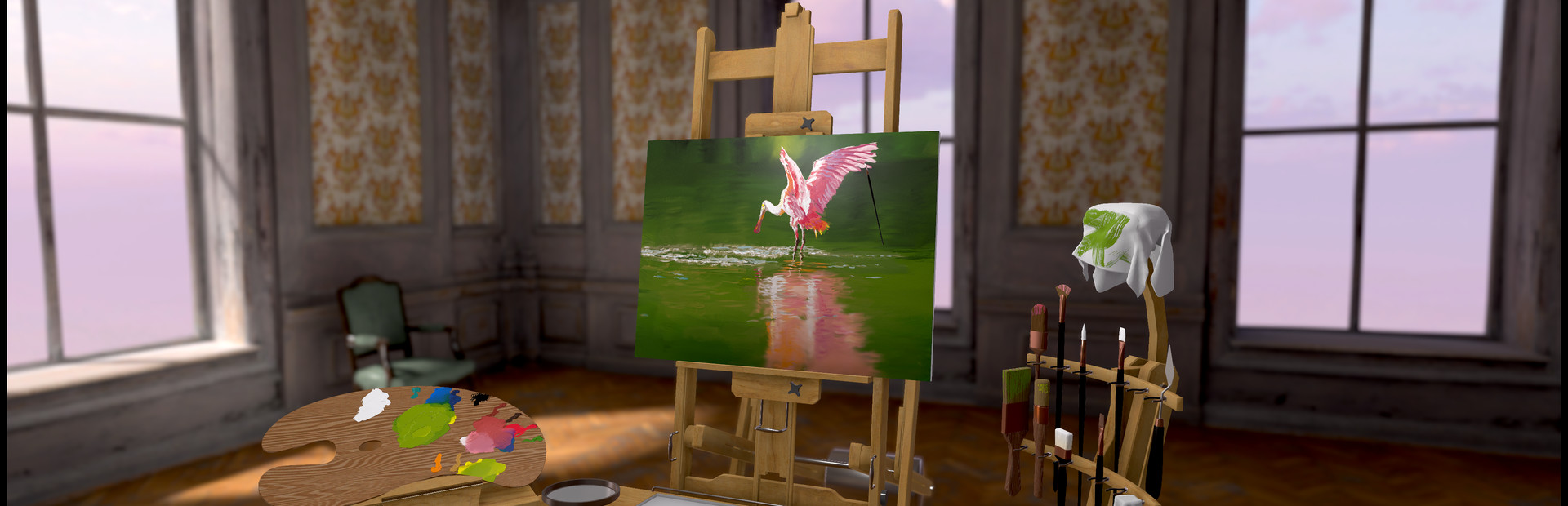
It’s time to discover your inner artist! With Vermillion, you get a fully equipped oil painting studio in your home, without any of the mess. Ready for the unrivaled sense of accomplishment from creating your first painting? Learn with your favorite YouTube artists using the built-in web browser, generate paint-by-numbers templates from any image, or even better - learn to paint from (new) friends in multiplayer!
Up to four people can paint together in the studio. Share palettes, work together on each other's canvas, teach a class, or have an old-fashioned paint night.
Vermillion features realistic wet-on-wet color mixing, undo, layers, and a wide range of simulated brushes. Developed with the feedback of both traditional and digital artists, you're sure to get the fun of oil painting without any of the frustration.
Once done, mount your masterpiece in your studio, or easily share it as an image. You can also create a beautifully varnished 3D model export for your VR home.
FEATURES:
Paint by numbers
You can now generate a paint by numbers template from your own images and any image you find online! Vermillion will generate the outlines, which you can show above or below the paint on the canvas. The palette will be automatically filled with the required colors, between 2 and 20. You can change how detailed you want the outlines to be. You can isolate outlines to one color at a time, so you can very easily apply the right color in the right area. Painting has never been more accessible!
Paint in other games
Ever dreamed of painting the mountains of Skyrim, or your favorite VRChat world? Vermillion can run as a SteamVR overlay, allowing you to paint inside any other VR game!
Multiplayer
Paint together with up to three of your friends, or new friends you meet in public rooms. Cross platform with Quest 2. Compatible with the overlay mode, so you can paint together inside other VR games. Note that the overlay only exists within Vermillion - other players not inside your Vermillion multiplayer session can not see your painting equipment.
Realistic color mixing
Vermillion allows you to blend colors as you would with real paints. Dip your brush into multiple colors, and mix a new color by whisking the brush on the palette - and yes, yellow and blue make green!
Integrated web browser with canvas projector
Never painted before? No problem! The easel has a web browser right next to it, allowing you to paint along with your favorite artists on YouTube for the first time without needing physical equipment, and giving you convenient access to the internet's vast library of learning resources and reference material.
Vermillion comes with an hour long in-game paint-along teaching you how to paint a cute robin - you'll hardly believe what you are capable of!
The browser can even be projected onto the canvas, so you can easily trace your reference. You can also display local images on the browser.
Mount your paintings
You can mount your paintings in the virtual studios, so you can enjoy your previous work while painting your next piece.
Designed for wet-on-wet painting
Vermillion is made for wet-on-wet painting. It mixes color not only on the palette, but also on the canvas, allowing you to create perfectly smooth gradients with just a few strokes. Use a dry brush to blend colors further, or to move paint around to create a variety of effects from reflections to grass.
Layers
While Vermillion is made to be the ultimate wet-on-wet experience, sometimes you just need to paint on another layer for detail work. Which is why it's fortunate that there is support for four separate layers that you can merge and re-order!
Fine control over every mark
Exert fine-grained control over your brushwork through the pressure with which you press the brush into the surface. Use the hand steadying tool to compensate for the lack of a physical canvas to rest your hand against.
Distinct brushes
From the two inch brush all the way down to the rigger, there's a brush for every occasion.
Sharable
You can export your finished painting as a 3D model to use in your VR home, share through Sketchfab, or use in social VR applications. Vermillion also offers up to 8k image export of your finished piece, which can be used for canvas prints!
Made for streamers
With a controllable spectator camera to offer great views of the process while streaming or recording, as well as full LIV support, you'll be sure to create amazing content.
Paintings in the trailer and screenshots by David Kühnel, Chad Munn, Gladski, and Markus Franz.

Vermillion - VR Painting — game info
- Platforms
- Windows
- Steam Deck
- Unsupported
- Player modes
- Single-player, Online co-op, Cross-platform multiplayer
- PC Game Pass
- Not included
What Steam players say
Recent verbatim reviews from Steam — separate from playze.io community reviews below.
I don't see this as a game as much as i see this as a tool, this tool is easily the best possible way to paint in VR. It is so flawless. + easy viewing of videos while painting, allowing to paint from tutorials. + paint by numbers, making it easy for people like me to learn. + extremely realistic painting tools. + extremely realistic paint physics. A real artist could easily sink hundreds of hours creating masterpieces, unfortunately, i am not a real artist, so i think ive done all the drawing my ADHD can handle. But an amazing masterpiece of a tool.3 found this helpful
This is a painting vr app, I'd say "what can you expect" but I'd rate this as the best I've used so far. In my opinion it outstrips Painting VR for usability and features. If you're serious about art and you want to give oil painting a go it's cheaper and less messy than real oil, and you can have up to 4 layers at a time, so it's got one of the most important quality of life features. If you want more of a review, check out the art that people have posted, that should tell you what you need to know!1 found this helpful
Vermillion - VR Painting, created by Thomas van den Berge, is not so much a game as it is a carefully crafted artistic environment that happens to exist within virtual reality. It strips away traditional notions of objectives, progression, and challenge, replacing them with something far more focused and deliberate: the act of painting itself. From the moment you enter its virtual studio, the experience makes its intent clear—it wants to recreate the process of oil painting as authentically as possible, while still offering the conveniences of a digital medium. The simulation of oil painting is the centerpiece, and it is handled with remarkable attention to detail. Colors behave as they would on a real palette, blending together in nuanced ways that reward experimentation and patience. Applying paint to the canvas carries a weight and texture that feels grounded, with strokes interacting based on thickness, layering, and technique. Rather than simplifying the process, Vermillion leans into its complexity, encouraging players to learn how paint works rather than bypassing those fundamentals. This gives the experience a sense of legitimacy that sets it apart from more casual creativ…1 found this helpful
I like to learn to paint and spit out my paintings with nice materials to use in games.
I spent 1 hour playing and wanna paint my day away. So far 10 out of 10. Worth it if you have a VR head set.
good
Community reviews
0 reviews
Sign in to write a review.
No reviews yet. Be the first to review this game.
More like Vermillion - VR Painting


News
 Xbox
XboxMinecraft Dungeons 2 Deluxe Edition: skip it, play on Game Pass
The Minecraft Dungeons 2 Deluxe Edition asks you to pre-order two unannounced DLC packs for a game Game Pass already gives you. What it contains, and why the upgrade can wait.
Sep 30, 2026 PC
PCIs DayZ worth it? A straight answer before you buy
Is DayZ worth it? Twelve years on it is still the genre's least forgiving game. What you are buying, who it suits, and what our 97-day price record says about the timing.
Sep 30, 2026 PC
PCTransport Fever 3 price: which edition to buy on launch day
Transport Fever 3 is out today. The Transport Fever 3 price splits three ways, the loyalty discount has a fortnight-long fuse, and our record shows what the older game really costs.
Sep 29, 2026 PC
PCNo Man's Sky price: how low it gets and when to buy
The No Man's Sky price has come a long way down since 2016, and the game is on PC Game Pass too. Our tracked 12-month low, the regional key gap, and what to actually pay.
Sep 29, 2026 Deals
DealsSekiro cheap: what our price record shows, and what to avoid
Search Sekiro cheap and the results are keyshop listings, not a store discount. Our three-month price record explains the gap, and why so few live offers changes the advice.
Sep 28, 2026 Freebies
System Shock 2 Remaster free on Epic from 1 October
System Shock 2 Remaster free on Epic from 1 to 8 October, alongside BURIED STARS. Our price record shows why its floor has not moved in three months, and why waiting beats buying this week.
Sep 28, 2026 PC
PCDead Island 2 cheap: which edition, and what the price does
Dead Island 2 cheap used to mean under a dollar. Our price record shows the floor has roughly doubled since September - here is which edition to buy, and the one that is a trap.
Sep 27, 2026 Deals
DealsSteam Autumn Sale 2026: the games that cannot be discounted
The Steam Autumn Sale 2026 runs 1-8 October, but Valve's own rules bar every September release from it. Which games are locked out, and what our record says about the two biggest.
Sep 27, 2026 PC
PCTekken 8 ღირს თუ არა: 91 ქულა და შერეული შეფასება
Tekken 8 ღირს თუ არა, როცა კრიტიკოსებს 91 ქულა აქვთ დაწერილი, მოთამაშეებს კი „შერეული"? ფასი, ონლაინის მდგომარეობა და უკეთესი ალტერნატივა.
Sep 24, 2026 Deals
DealsStellaris იაფად: ოცდახუთი დამატება და ერთი გამოსავალი
Stellaris იაფად ყიდვა საბაზისო თამაშის შემთხვევაში მარტივია. ძვირი დამატებებია — და მათთვის არსებობს ვარიანტი, რომელსაც ბევრი ვერ ამჩნევს.
Sep 24, 2026 PC
PCARK ფასი: Evolved თუ Ascended — რომელი ვიყიდოთ
ARK ფასი ორი სხვადასხვა თამაშის ფასია. რომელი ჯობია ქართული სიიდან, სად არიან მოთამაშეები და რატომ არ ღირს ახალ ვერსიაზე გადახტომა.
Sep 24, 2026 Deals
DealsCivilization 6 იაფად: რომელი დამატება ღირს მართლა
Civilization 6 იაფად ყიდვა მარტივია — საბაზისო თამაში იაფია და იაფად რჩება. რთული ის არის, რომ ცხრამეტი დამატებიდან სწორი აირჩიოთ.
Sep 24, 2026 Freebies
CS2 უფასოდ: რა ღირს სინამდვილეში Prime
CS2 უფასოდ ითამაშება საქართველოდანაც და ეს დემო არაა. ფული მხოლოდ Prime-ს სჭირდება — აი, რას იძლევა ის და ვის ღირს.
Sep 24, 2026 PC
PCCuphead ღირს თუ არა: სირთულე, DLC და ორზე თამაში
Cuphead ღირს თუ არა: ექვსივე ქართულ მაღაზიაში ერთი ფასია, მეგობარს კი ასლი საერთოდ არ სჭირდება. სირთულე, ერთადერთი დამატება და როდის ვიყიდოთ.
Sep 23, 2026 Deals
DealsRimWorld იაფად: ბაზა, ხუთი დამატება და სწორი რიგი
RimWorld იაფად ყიდვა დამატებების რიგზეა დამოკიდებული, არა ფასდაკლების ლოდინზე. რომელი ხუთიდან ღირს ჯერ და რომელ მაღაზიას აქვს ფასდაკლება.
Sep 23, 2026 PC
PCPhasmophobia ფასი: ოთხი ასლი და ერთი მაღაზია
Phasmophobia ფასი ქართულ სიაში მხოლოდ ერთ მაღაზიაში ჩანს, თამაში კი ოთხზეა გათვლილი. რატომ ღირს ფასდაკლების დალოდება და რა გჭირდებათ დასაწყებად.
Sep 23, 2026Top games right now
All rankings →- 1Counter-Strike 2Free
- 2Dota 2Free
- 3PUBG: BATTLEGROUNDSFree
- 4Grand Theft Auto V Legacy—
- 5Terraria$2.20
- 6Rust$25.98
- 7Team Fortress 2Free
- 8Black Myth: Wukong$35.70
- 9HELLDIVERS™ 2$30.92
- 10ELDEN RING$52.89
- 11Apex Legends™Free
- 12Left 4 Dead 2$9.99
- 13Stardew Valley$14.74
- 14Wallpaper Engine$3.99
- 15Euro Truck Simulator 2$4.99
- 16Dead by Daylight$10.40
- 17Red Dead Redemption 2$12.60
- 18Baldur's Gate 3$41.99
- 19Phasmophobia$18.24
- 20War ThunderFree
- 21Call of Duty®—
- 22ARK: Survival Evolved$14.20
- 23Among Us$3.03
- 24The Forest$19.99