
V-Art- VR Painting Studio
Bolt-Scripts · July 20, 2023 · Simulation, Sandbox, Design & Illustration, VR, Relaxing
V-Art- VR Painting Studio is free to play — no purchase needed. We track it so you know if that ever changes.
Screenshots
V-Art- VR Painting Studio price
V-Art- VR Painting Studio is free to play — there is no purchase price, on Steam or anywhere else we track. We keep watching it, so if it ever stops being free the price history on this page will show when that happened and what it changed to.
About V-Art- VR Painting Studio
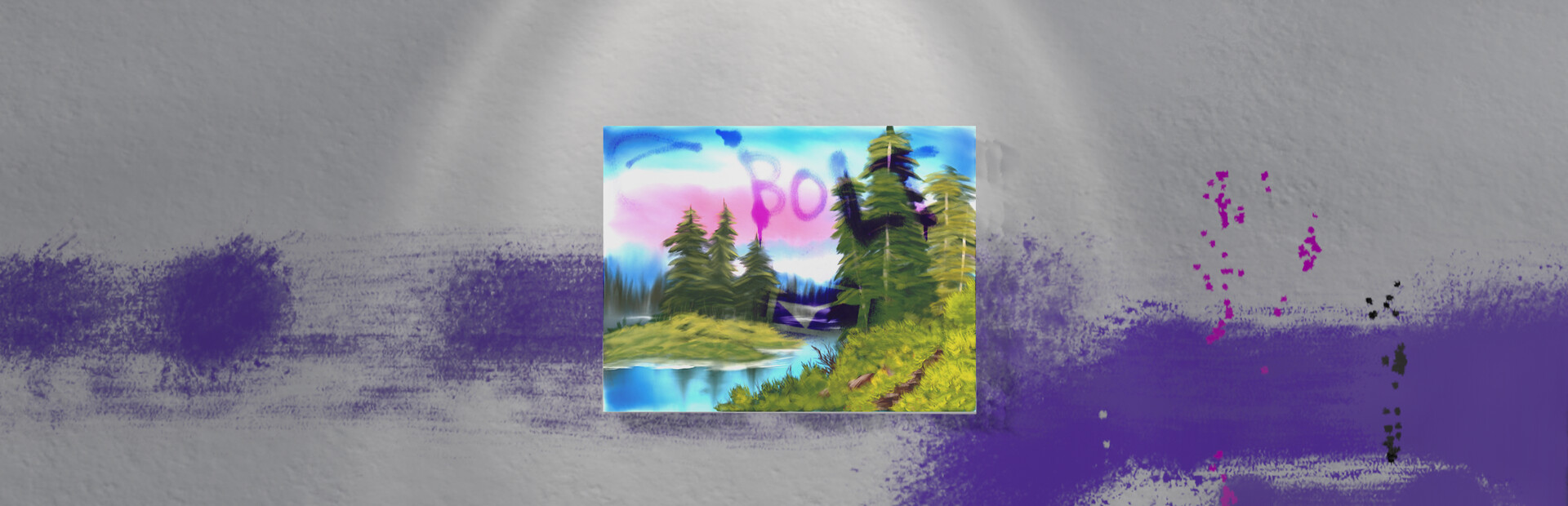
Really, there's no pressure to create anything 'good' or 'professional'. It's just a fun way to mess around with different colors and textures. Plus, there's an optional DLC if you want to support me that lets you paint on a 3D character model. I'll just say, it's pretty fun to see your creations come to life on a more tangible canvas.
But again, just to be clear, this game isn't meant to be a professional tool for artists, there are better tools for that.
Still, though it's not a professional tool, I think you'll be able to create some amazing pieces of art.
It's not the most advanced painting game out there, but it's free and it's a fun way to explore your creativity. Give it a try and see what you can come up with.
Some notable features:
-Physically controlled arms and objects really connect you to the canvas, or, mess you up when your hand wibbles, you choose
-Dynamic paint wetness that dries over time
-Simulated brush texture gives your strokes character
-Spray paints and blobs that drip when they pool up
-Mix paints on your palette so you can pretend like you aren't already living in a simulation
-Some of the paint dried up, so we recycled it into goo. By this, I mean for some reason you can drip goo onto your canvas. Or just play with it like slime, everyone loves slime
-Paint all the walls and floor to give your studio a personal touch
-Display your created works upon the walls like your own miniature art gallery
-An inexplicable cellular device that allows you to capture stereoscopic renders of your work
-Import your own brush textures for unique styles
-Add custom stencils so you can follow along with that one Bob tutorial where he starts with a perfect circle for the sun
-An ancient flatscreen television from the past that has been retrofitted with the latest YouTube playing capabilities, so you can watch Mr. Ross paint faster than you while you try to keep up
-Menus
-Paint inside the safety of your studio that you'll notice, has no doors. This is intentional and not cause for concern. Alternatively, drop the walls (literally) and behold a lush grassy field powered by the future technology of GrassFlow™. Do note, you will still be trapped inside the studio despite it appearing as if you may actually walk into the wilderness, we apologize if the simulation appears too real.
-Seamless autosave relieves you of the stress caused by imminent data loss. Or overwrite your work so you can live with all your happy little accidents
-A mysterious orb
-Strange dystopian future where painting supplies are dispensed out of thin air from manually operated vending machines powered by lever action
-Am I talking the features up too much? Probably.
V-Art- VR Painting Studio — game info
- Platforms
- Windows
- Steam Deck
- Unsupported
- Player modes
- Single-player
- PC Game Pass
- Not included
DLC & expansions

What Steam players say
Recent verbatim reviews from Steam — separate from playze.io community reviews below.
My experience with this game honestly wasn't the best, in retrospect it seems like a good game but the hands are quite buggy and the brushes are a bit hard to hold, there are a lot of bugs in this game and it doesn't seem like they are working on being patched which makes this game not enjoyable because it isn't running smoothly. As far as good aspects go through, the paint blending in this game is really nice and gives you a good sense for creativity and there's also a pretty good span of brushes. But in this case, I just don't think it's a good VR painting game given all of the bugs.2 found this helpful
Long time ago i tried it. did not like it. but today wanted to try again, but the game kept starting flat in my Quest 3. it was not flat on PC - so i could not play it on computer. And I could not play it on Quest 3 where it remained flat and unusable. I restarted several times. : no go! big Waist of time. And there was no way to exit the game. I could not even restart the computer. Had to unplug the computer. boo1 found this helpful
With Arch Linux + Valve Index + Nvidia 2080 + SteamVR 2.8.6 this is an unplayable mess. There are by now established ways of picking up and holding objects in VR - none of them are used here. I eventually figured out a way to pick up the paint bottles by knocking them onto their sides and then moving the hand onto them to *automatically* pick them up. In the process however I knocked the palette onto the floor out of reach of my lighthouses. I don't like to leave negative reviews for free projects, but I think the hand-object interactions need to be reworked from scratch and all the assumptions that have been made about the user's setup overcome. Tactility is the great advantage of VR, but we don't want tactility in picking up the paint bottle - really just in applying the paint to the canvas. The airbrush tools in the VR Home area or Google's Tilt Brush are good ways to do this, but a more authentic paintbrush-experience would be very welcome too. This isn't it - effort has gone into counterproductive areas.1 found this helpful
hands are a mess and good luck trying to adjust the canvas
Wow!! the bugs of shaking hands. is not possible to draw something well. Very hoping the soon update.
I was impressed with how realistic the painting felt; I'm definitely going to recommend it to my friends.
Community reviews
0 reviews
Sign in to write a review.
No reviews yet. Be the first to review this game.
More like V-Art- VR Painting Studio


News
 Xbox
XboxMinecraft Dungeons 2 Deluxe Edition: skip it, play on Game Pass
The Minecraft Dungeons 2 Deluxe Edition asks you to pre-order two unannounced DLC packs for a game Game Pass already gives you. What it contains, and why the upgrade can wait.
Sep 30, 2026 PC
PCIs DayZ worth it? A straight answer before you buy
Is DayZ worth it? Twelve years on it is still the genre's least forgiving game. What you are buying, who it suits, and what our 97-day price record says about the timing.
Sep 30, 2026 PC
PCTransport Fever 3 price: which edition to buy on launch day
Transport Fever 3 is out today. The Transport Fever 3 price splits three ways, the loyalty discount has a fortnight-long fuse, and our record shows what the older game really costs.
Sep 29, 2026 PC
PCNo Man's Sky price: how low it gets and when to buy
The No Man's Sky price has come a long way down since 2016, and the game is on PC Game Pass too. Our tracked 12-month low, the regional key gap, and what to actually pay.
Sep 29, 2026 Deals
DealsSekiro cheap: what our price record shows, and what to avoid
Search Sekiro cheap and the results are keyshop listings, not a store discount. Our three-month price record explains the gap, and why so few live offers changes the advice.
Sep 28, 2026 Freebies
System Shock 2 Remaster free on Epic from 1 October
System Shock 2 Remaster free on Epic from 1 to 8 October, alongside BURIED STARS. Our price record shows why its floor has not moved in three months, and why waiting beats buying this week.
Sep 28, 2026 PC
PCDead Island 2 cheap: which edition, and what the price does
Dead Island 2 cheap used to mean under a dollar. Our price record shows the floor has roughly doubled since September - here is which edition to buy, and the one that is a trap.
Sep 27, 2026 Deals
DealsSteam Autumn Sale 2026: the games that cannot be discounted
The Steam Autumn Sale 2026 runs 1-8 October, but Valve's own rules bar every September release from it. Which games are locked out, and what our record says about the two biggest.
Sep 27, 2026 PC
PCTekken 8 ღირს თუ არა: 91 ქულა და შერეული შეფასება
Tekken 8 ღირს თუ არა, როცა კრიტიკოსებს 91 ქულა აქვთ დაწერილი, მოთამაშეებს კი „შერეული"? ფასი, ონლაინის მდგომარეობა და უკეთესი ალტერნატივა.
Sep 24, 2026 Deals
DealsStellaris იაფად: ოცდახუთი დამატება და ერთი გამოსავალი
Stellaris იაფად ყიდვა საბაზისო თამაშის შემთხვევაში მარტივია. ძვირი დამატებებია — და მათთვის არსებობს ვარიანტი, რომელსაც ბევრი ვერ ამჩნევს.
Sep 24, 2026 PC
PCARK ფასი: Evolved თუ Ascended — რომელი ვიყიდოთ
ARK ფასი ორი სხვადასხვა თამაშის ფასია. რომელი ჯობია ქართული სიიდან, სად არიან მოთამაშეები და რატომ არ ღირს ახალ ვერსიაზე გადახტომა.
Sep 24, 2026 Deals
DealsCivilization 6 იაფად: რომელი დამატება ღირს მართლა
Civilization 6 იაფად ყიდვა მარტივია — საბაზისო თამაში იაფია და იაფად რჩება. რთული ის არის, რომ ცხრამეტი დამატებიდან სწორი აირჩიოთ.
Sep 24, 2026 Freebies
CS2 უფასოდ: რა ღირს სინამდვილეში Prime
CS2 უფასოდ ითამაშება საქართველოდანაც და ეს დემო არაა. ფული მხოლოდ Prime-ს სჭირდება — აი, რას იძლევა ის და ვის ღირს.
Sep 24, 2026 PC
PCCuphead ღირს თუ არა: სირთულე, DLC და ორზე თამაში
Cuphead ღირს თუ არა: ექვსივე ქართულ მაღაზიაში ერთი ფასია, მეგობარს კი ასლი საერთოდ არ სჭირდება. სირთულე, ერთადერთი დამატება და როდის ვიყიდოთ.
Sep 23, 2026 Deals
DealsRimWorld იაფად: ბაზა, ხუთი დამატება და სწორი რიგი
RimWorld იაფად ყიდვა დამატებების რიგზეა დამოკიდებული, არა ფასდაკლების ლოდინზე. რომელი ხუთიდან ღირს ჯერ და რომელ მაღაზიას აქვს ფასდაკლება.
Sep 23, 2026 PC
PCPhasmophobia ფასი: ოთხი ასლი და ერთი მაღაზია
Phasmophobia ფასი ქართულ სიაში მხოლოდ ერთ მაღაზიაში ჩანს, თამაში კი ოთხზეა გათვლილი. რატომ ღირს ფასდაკლების დალოდება და რა გჭირდებათ დასაწყებად.
Sep 23, 2026Top games right now
All rankings →- 1Counter-Strike 2Free
- 2Dota 2Free
- 3PUBG: BATTLEGROUNDSFree
- 4Grand Theft Auto V Legacy—
- 5Terraria$2.20
- 6Rust$25.62
- 7Team Fortress 2Free
- 8Black Myth: Wukong$35.70
- 9HELLDIVERS™ 2$30.56
- 10ELDEN RING$52.89
- 11Apex Legends™Free
- 12Left 4 Dead 2$9.99
- 13Stardew Valley$14.73
- 14Wallpaper Engine$3.99
- 15Euro Truck Simulator 2$4.99
- 16Dead by Daylight$10.40
- 17Red Dead Redemption 2$10.54
- 18Baldur's Gate 3$41.99
- 19Phasmophobia$18.29
- 20War ThunderFree
- 21Call of Duty®—
- 22ARK: Survival Evolved$14.24
- 23Among Us$3.03
- 24The Forest$19.99