
Stop Sign VR Tools
Reality Inside Ltd. · December 17, 2019 · Indie, Action, Sports, Early Access, VR
Buy Stop Sign VR Tools from Steam at $5.99 — the cheapest of 1 store we compare.
 Buy at Steam
 Where to buy Stop Sign VR Tools — official stores
Stop Sign VR Tools price by region
Stop Sign VR Tools costs $3.99 in Georgia (USD), £4.79 in the United Kingdom, $5.99 in the United States, CA$6.69 in Canada, NZ$7.59 in New Zealand, A$8.50 in Australia, R$12.39 in Brazil and zł21.99 in Poland right now.
| Region | Best price | Official store | Key shop | Stores |
|---|---|---|---|---|
 Georgia (USD) Georgia (USD) | $3.99 | $3.99 | — | 1 |
 United Kingdom United Kingdom | £4.79 | £4.79 | — | 1 |
 United Statesyour region United Statesyour region | $5.99 | $5.99 | — | 1 |
 Canada Canada | CA$6.69 | CA$6.69 | — | 1 |
 New Zealand New Zealand | NZ$7.59 | NZ$7.59 | — | 1 |
 Australia Australia | A$8.50 | A$8.50 | — | 1 |
 Brazil Brazil | R$12.39 | R$12.39 | — | 1 |
 Poland Poland | zł21.99 | zł21.99 | — | 1 |
Each row is a real price from that region's own stores, not a currency conversion, so the figures are not directly comparable. Switch regions in the header to shop the one you buy in.
Screenshots
About Stop Sign VR Tools
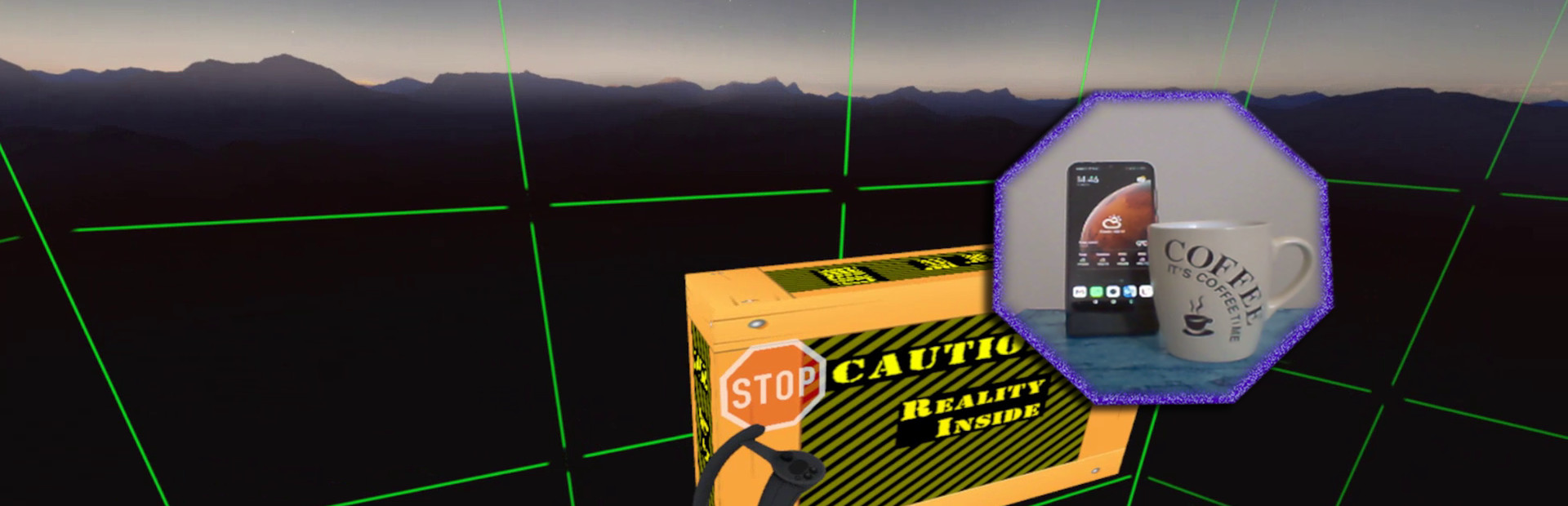
Cam Circle uses the headset cameras to show a live view of the real world in a circle in front of you. It has easy shortcuts and activates almost instantly. You can activate Cam Circle by double tapping the headset, or by pressing both grip buttons at the same time. Cam Circle is very useful for quick looks outside the headset and for picking up the controllers after putting on the headset. You can even set it to automatically activate when you put on the headset.
If you use an Index or Vive Pro, Cam Circle can show the pass-through video in 3D. On a Vive it's monoscopic (2D). Cam Circle is not (yet) available for WMR or Oculus headsets.
Boundary++ is a new warning grid system that will show up when you approach your walls and ceiling. It works with native SteamVR headsets, Windows Mixed Reality (WMR) headsets, Oculus PC connected headsets and 'Mixed VR' sets (e.g. a WMR headset with Valve Index controllers). It will automatically import the WMR boundaries or Oculus Guardian (when using a Rift-S).
Boundary++ will not light up the whole play area, but it will only show where you are actually near your boundaries. It can be used together with the default SteamVR chaperone, or just by itself.
Warning Boxes are virtual boxes that you place around your valuable real equipment, such as TVs, ceiling fans, room lighting and so on. They help you avoid hitting real stuff in and around your VR play area.
While you are playing a game a prediction algorithm warns you of possible impacts using sound, images and haptic feedback.
The boxes will fade out when you move away from them. The fade-out and full-visibility distances can be configured for each box separately.
If you can't find your boxes because they're faded out, press the system button and look around.
The HUD is a Heads-Up Display that will show up when you are moving backwards into a wall or other boundary object, such as a Warning Box.
Extras and other info:
- A box can be configured to show content by other overlay apps. E.g. a box can show the fpsVR overlay on one of its sides, or it can show the content of a Desktop+ overlay.
- Do you use a Mixed VR set and experience grey screens with seated games? This app has a fix for that problem. You can find it on the Boundary++ settings page on the SteamVR dashboard.
- All basic settings are accessible on the SteamVR dashboard pages for Stop Sign VR. Next to the basic settings there are many things that can be configured and fine-tuned using the separate Settings Editor program in Windows (not in VR). Also use this Settings Editor to add more virtual boxes, delete or edit them. You can start the Settings Editor from the Windows System Tray, next to the clock in the bottom right corner of your desktop.
- The Stop Sign VR Tools runtime is 100% coded in C++ and optimized to spend very little CPU/GPU cycles. It does not harm the performance of other VR software.
- The alert sounds are spatialized by Steam Audio's HRTF-based binaural rendering so you will hear where the closest wall or object is, even if you can't see it.
Stop Sign VR Tools — game info
- Platforms
- Windows
- Steam Deck
- Unsupported
- Player modes
- Single-player
- PC Game Pass
- Not included
What Steam players say
Recent verbatim reviews from Steam — separate from playze.io community reviews below.
the app does "work", but it is very buggy and if you need some more advanced settings it does not work, it doesn't even remember my room set up, and I usually don't leave bad reviews, but there is little no help or videos explaining how this works! I'm disappointed2 found this helpful
So far does not do what it says , i have posted on the forums for a answer but to no reply at such. will change this post if i get a answer to post.1 found this helpful
Super useful. I don't have a large playspace, so having guides that show up with proximity for my bed, table, and anything else that might potentially get wacked during gameplay is incredible for not getting hand injuries. The way you have to edit the settings is a tad annoying, but not impossible to do while in vr. Shame Steam's chaperone is so rudimentary that we need third party apps to do it for us, but thankfully this has made it a lot easier to enjoy my expensive ass vr
does not work properly
Very useful. Good job dev.
This App will always hog the "now playing" slot as seen in the friendslist. If someone wants to hide what they're playing from friends they can go invisible or turn it off. Those who want to show their current game (like me) really hate that the Stop-Sign devs don't care to implement it. I've had a (very) short discussion with the dev Ray. I guess he is jsut happy with the status-quo (i.e. us advertizing his game for free). Get Turnsignal or something else instead! They are obviously either more capable devs or care about user-friendlyness.
Community reviews
0 reviews
Sign in to write a review.
No reviews yet. Be the first to review this game.
More like Stop Sign VR Tools


News
 Deals
DealsRemember Me Steam key: where to buy, and what to check
A Remember Me Steam key costs a fraction of the storefront price, and our 86-day record says that gap is not a sale. Where to buy, what each route risks, and the two regions it fails in.
Oct 17, 2026 PC
PCTales of Eternia Remastered price: which store, and the Deluxe
Tales of Eternia Remastered price varies more between shops than it is likely to move all month. What our launch-week record shows, which edition to take, and where the key market is absent.
Oct 17, 2026 PC
PCFinal Fantasy XI price: what you pay, then keep paying
The Final Fantasy XI price is two numbers, and the subscription is the one that matters. Our tracked low, what the Ultimate Collection includes, and when buying at list is correct.
Oct 16, 2026 PC
PCCastlevania Belmont's Curse price: which edition to buy
The Castlevania Belmont's Curse price splits in two: Steam charges full list, authorised resellers a quarter less. Our record says that 25% has not moved since June, and is the floor.
Oct 16, 2026 Deals
DealsHogwarts Legacy price history: where the floor really is
Our Hogwarts Legacy price history runs to 100 daily readings and a $3.99 median. Why the sub-dollar figure in search results is noise, and what to actually pay.
Oct 15, 2026 PC
PCEnshrouded price after 1.0: what it costs now
Enshrouded hit 1.0 today, but the Enshrouded price rose on 8 September and the key resellers have not followed. What our nine tracked sellers show, and whether to buy now.
Oct 15, 2026 PC
PCStarfield price history: the sub-$20 window, and who set it
Our Starfield price history shows one reseller set the all-time low over five weeks in late summer 2026. What a good price looks like now, and why Game Pass comes first.
Oct 14, 2026 PC
PCBoltgun 2 price: buy the sequel, or the cheap first game?
The Boltgun 2 price has no cheaper route on launch day — our record shows one listing, unmoved since September. The first game is the bargain, but a smaller one than it was.
Oct 14, 2026 PC
PCTekken 8 ღირს თუ არა: 91 ქულა და შერეული შეფასება
Tekken 8 ღირს თუ არა, როცა კრიტიკოსებს 91 ქულა აქვთ დაწერილი, მოთამაშეებს კი „შერეული"? ფასი, ონლაინის მდგომარეობა და უკეთესი ალტერნატივა.
Sep 24, 2026 Deals
DealsStellaris იაფად: ოცდახუთი დამატება და ერთი გამოსავალი
Stellaris იაფად ყიდვა საბაზისო თამაშის შემთხვევაში მარტივია. ძვირი დამატებებია — და მათთვის არსებობს ვარიანტი, რომელსაც ბევრი ვერ ამჩნევს.
Sep 24, 2026 PC
PCARK ფასი: Evolved თუ Ascended — რომელი ვიყიდოთ
ARK ფასი ორი სხვადასხვა თამაშის ფასია. რომელი ჯობია ქართული სიიდან, სად არიან მოთამაშეები და რატომ არ ღირს ახალ ვერსიაზე გადახტომა.
Sep 24, 2026 Deals
DealsCivilization 6 იაფად: რომელი დამატება ღირს მართლა
Civilization 6 იაფად ყიდვა მარტივია — საბაზისო თამაში იაფია და იაფად რჩება. რთული ის არის, რომ ცხრამეტი დამატებიდან სწორი აირჩიოთ.
Sep 24, 2026 Freebies
CS2 უფასოდ: რა ღირს სინამდვილეში Prime
CS2 უფასოდ ითამაშება საქართველოდანაც და ეს დემო არაა. ფული მხოლოდ Prime-ს სჭირდება — აი, რას იძლევა ის და ვის ღირს.
Sep 24, 2026 PC
PCCuphead ღირს თუ არა: სირთულე, DLC და ორზე თამაში
Cuphead ღირს თუ არა: ექვსივე ქართულ მაღაზიაში ერთი ფასია, მეგობარს კი ასლი საერთოდ არ სჭირდება. სირთულე, ერთადერთი დამატება და როდის ვიყიდოთ.
Sep 23, 2026 Deals
DealsRimWorld იაფად: ბაზა, ხუთი დამატება და სწორი რიგი
RimWorld იაფად ყიდვა დამატებების რიგზეა დამოკიდებული, არა ფასდაკლების ლოდინზე. რომელი ხუთიდან ღირს ჯერ და რომელ მაღაზიას აქვს ფასდაკლება.
Sep 23, 2026 PC
PCPhasmophobia ფასი: ოთხი ასლი და ერთი მაღაზია
Phasmophobia ფასი ქართულ სიაში მხოლოდ ერთ მაღაზიაში ჩანს, თამაში კი ოთხზეა გათვლილი. რატომ ღირს ფასდაკლების დალოდება და რა გჭირდებათ დასაწყებად.
Sep 23, 2026New releases
All new releases →- AION 2Sep 30, 2026Free
- Minecraft Dungeons IISep 29, 2026$23.15
- Onimusha: Way of the SwordSep 25, 2026$40.47
- WARDOGSSep 10, 2026$33.99
- The Blood of DawnwalkerSep 2, 2026$52.61
- STAR WARS Zero Company™Aug 27, 2026$44.50
- How to FishAug 20, 2026$6.39
- Mortal Shell IIAug 20, 2026$49.99
- Mandate OrderAug 12, 2026$6.74
- GRAIN ROTAug 7, 2026$9.99
- Big WalkAug 4, 2026$19.99
- Control, I'm Not Coming BackMay 29, 2026Free
- TBH: Task Bar HeroMay 27, 2026Free
- CrystalfallApr 10, 2026Free
- Eastern EraMar 28, 2026$8.99
- The Seven Deadly Sins: OriginMar 16, 2026Free
- Funi Raccoon GameMar 13, 2026$11.99
- Homura HimeMar 4, 2026$24.99
- One Turn KillJan 15, 2026$7.99
- ODDCOREJan 7, 2026$12.99
- Your MomDec 26, 2025$1.59
- Reign of GuildsNov 26, 2025Free
- My Wife Threw Out My Card Collection (So I Bought a Dump to Find Them All) ⭐Nov 25, 2025$5.56
- The Séance of Blake ManorOct 27, 2025$9.00
Top games right now
All rankings →- 1Counter-Strike 2Free
- 2Dota 2Free
- 3PUBG: BATTLEGROUNDSFree
- 4Grand Theft Auto V Legacy—
- 5Terraria$2.17
- 6Rust$26.59
- 7Team Fortress 2Free
- 8Black Myth: Wukong$36.54
- 9HELLDIVERS™ 2$25.63
- 10ELDEN RING$49.15
- 11Apex Legends™Free
- 12Left 4 Dead 2$9.99
- 13Stardew Valley$14.60
- 14Wallpaper Engine$3.99
- 15Euro Truck Simulator 2$9.91
- 16Dead by Daylight$7.01
- 17Red Dead Redemption 2$11.01
- 18Baldur's Gate 3$56.77
- 19Phasmophobia$19.99
- 20War ThunderFree
- 21Call of Duty®—
- 22ARK: Survival Evolved$14.99
- 23Among Us$2.99
- 24The Forest$19.77