
Lumiric Stage
Lumiric Studio · June 30, 2026 · Video Production, Audio Production, Music, Software, Singleplayer
Buy Lumiric Stage from Steam at $22.49 — the cheapest of 1 store we compare.
 Buy at Steam
 Where to buy Lumiric Stage — official stores
Lumiric Stage price by region
Lumiric Stage costs £20.24 in the United Kingdom, $22.49 in the United States, $22.49 in Georgia (USD), €22.94 in Europe (EUR), CA$26.99 in Canada, A$31.45 in Australia, NZ$34.64 in New Zealand, R$75.59 in Brazil and zł94.49 in Poland right now.
| Region | Best price | Official store | Key shop | Stores |
|---|---|---|---|---|
 United Kingdom United Kingdom | £20.24 −10% | £20.24 | — | 1 |
 United Statesyour region United Statesyour region | $22.49 −10% | $22.49 | — | 1 |
 Georgia (USD) Georgia (USD) | $22.49 −10% | $22.49 | — | 1 |
 Europe (EUR) Europe (EUR) | €22.94 −10% | €22.94 | — | 1 |
 Canada Canada | CA$26.99 −10% | CA$26.99 | — | 1 |
 Australia Australia | A$31.45 −10% | A$31.45 | — | 1 |
 New Zealand New Zealand | NZ$34.64 −10% | NZ$34.64 | — | 1 |
 Brazil Brazil | R$75.59 −10% | R$75.59 | — | 1 |
 Poland Poland | zł94.49 −10% | zł94.49 | — | 1 |
Each row is a real price from that region's own stores, not a currency conversion, so the figures are not directly comparable. Switch regions in the header to shop the one you buy in.
Screenshots
About Lumiric Stage
Lumiric Stage
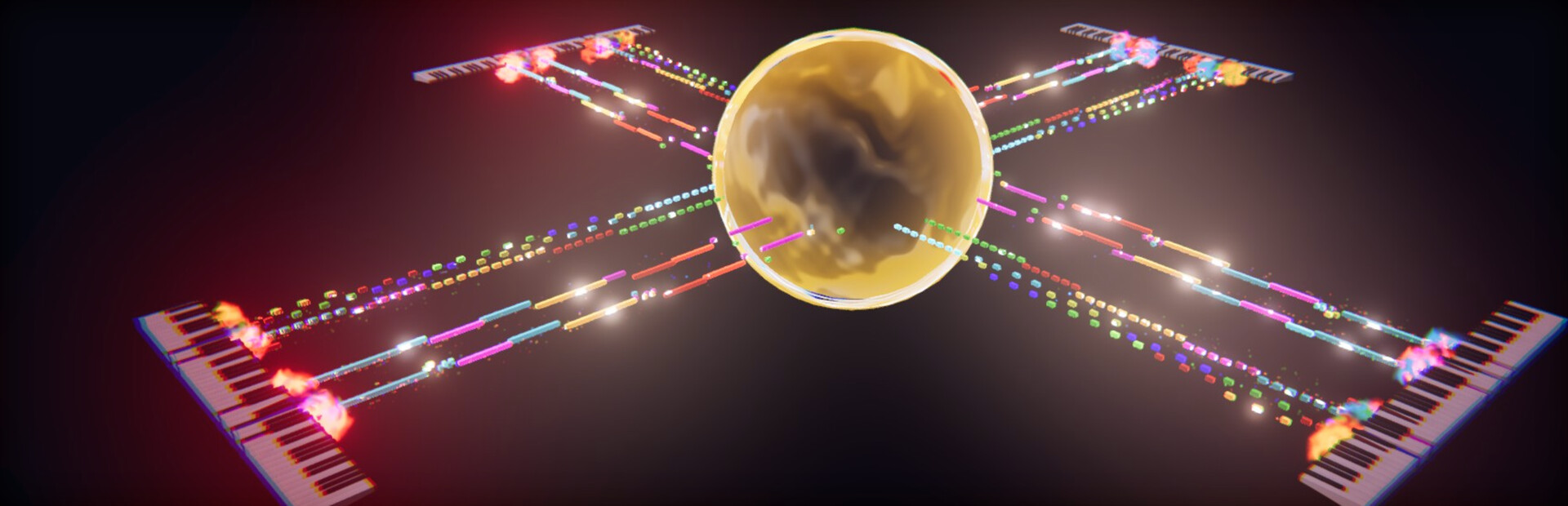
Turn MIDI files and live performances into visual content.Lumiric Stage is a real-time MIDI visualization and music content creation tool designed for creators, pianists, educators, and streamers.Create piano videos, tutorials, livestreams, educational content, and cinematic performances using Magic Piano, Floating Labels, built-in camera support, customizable note visuals, and immersive real-time Stages.This is not just a piano roll.This is a stage.Built for Music Content Creators
Most MIDI visualization workflows require multiple tools, video editing software, perspective correction, and manual synchronization between video and MIDI data.Lumiric Stage was designed to simplify that process.With built-in camera support, Magic Piano calibration, Floating Labels, and Falling Notes Video Sync, you can create educational videos, piano performances, livestreams, and social media content directly inside a single application.Whether you want to teach, perform, stream, or grow your music content, Lumiric Stage helps turn your playing into something people can see, follow, and remember.Magic Piano
Have you ever seen those “Magic Piano” videos where visual notes align perfectly with a real piano?Creating that effect usually requires recording MIDI, recording video, aligning both sources, correcting perspective, syncing everything manually, and finishing the result in editing software.Lumiric Stage makes this workflow much simpler.With Magic Piano, you only need to place three calibration handles on your real piano: the lowest note, middle C (C4), and the highest note. Lumiric Stage uses these points to align visual effects directly to your camera view, regardless of piano size or camera angle.Combined with Falling Notes Video Sync, notes can travel toward the piano and arrive exactly when the video shows you pressing the key. This makes it possible to create tutorials, performances, and livestreams with falling-note visuals without doing the synchronization later in post-production.Floating Labels
Floating Labels display musical notation directly on the visual notes, making your performances easier to follow, teach, and share.Choose between International notation, Solfège, or Nashville numbers, then customize the label size, text, background, colors, and animation behavior.Label colors can be fixed or dynamically generated using modes such as Follow Note, Follow Piano, Complementary, or Analogous, helping your content stay readable and visually cohesive.Used together with Magic Piano, Floating Labels can turn a real piano performance into a clear educational video, tutorial, or livestream where viewers can see not only what is being played, but also understand the notes behind the music.Music Guide
Lumiric Stage includes Music Guide tools designed to help creators, students, and educators visualize music more clearly.Choose a key, scale, and notation system, then display labels on the piano or directly on the moving notes. You can use scale-aware visualization, degree-based coloring, and out-of-scale feedback to make musical structure easier to see.Whether you are explaining chords, practicing a difficult passage, or creating educational content, Music Guide helps transform music theory into something visual and immediate.Note Coloring
Lumiric Stage lets you define how notes are colored across the entire performance.Use simple coloring modes such as MIDI Channel, individual Note, or Velocity, or switch to Degree-based coloring when working with a selected key and scale.Degree coloring makes harmonic relationships easier to see by assigning colors based on each note’s musical role inside the scale. This can be especially useful for tutorials, music theory explanations, improvisation practice, and educational videos.Notes outside the selected scale can also be visually separated, helping viewers immediately identify notes that do not belong to the current musical context.Combined with Floating Labels and Music Guide, Note Coloring turns MIDI visualization into a clearer and more educational visual language, while still allowing creators to build their own unique aesthetic style.Playback and Note Flow
Lumiric Stage gives you control over how notes move through the scene.Use Note Flow to switch between Incoming (Falling Notes) and Outgoing (Default Mode). Incoming mode creates the classic falling-note style used for tutorials and learning workflows, while Outgoing mode lets notes emerge from the instrument for a more cinematic performance look.Unlike traditional visualizers that mainly send notes upward or forward, Lumiric Stage lets you rotate note paths in 360 degrees using Path Angle. This makes it possible to direct notes toward the camera, across the stage, behind a performer, or into cinematic stage elements.Travel Time controls how long notes take to move along their path, while MIDI Speed lets you slow down or speed up MIDI file playback. This makes it easier to study difficult songs at half speed, especially when combined with Floating Labels that show the note names before they reach the piano.MIDI Player
At its core, Lumiric Stage can also be used as a MIDI music player.Load MIDI files and SoundFont (.sf2) files, listen to your music, and watch each performance become a visual scene in real time.This makes Lumiric Stage useful not only for creating videos and livestreams, but also for simply enjoying your favorite MIDI performances with custom instruments, colors, stages, and visual effects.Smart Playlist
Lumiric Stage includes a playlist system for users who want to listen, watch, or loop their favorite MIDI performances.When you favorite a song, Lumiric Stage saves more than just the MIDI file. It can also preserve the selected SoundFont, Stage, visual settings, and performance configuration used with that song.This means each favorite becomes a complete performance preset: the music, the sound, and the visual identity are kept together.Stages
Stages define the visual environment where your music comes to life.Void is a clean, minimal Stage designed for clarity, learning, streaming, Magic Piano, and Floating Labels. It keeps the focus on the instrument, the notes, and the viewer’s understanding of the performance.Singularity is a cinematic Stage built around a dramatic black-hole-inspired core. It is designed for more expressive performances, sci-fi visuals, multi-performer setups, and showcase videos.Choose a clean setup for tutorials and livestreams, or a cinematic environment when you want the music to feel like a visual performance.Post-Processing
Lumiric Stage includes a post-processing system that helps shape the final look of your performance.Effects such as Vignette, Chromatic Aberration, Bloom, Lens effects, and other visual treatments can be adjusted independently.Post-processing can also react to the intensity of the music. For example, Chromatic Aberration can remain subtle during quiet moments and become stronger when the music intensifies, creating psychedelic or cinematic reactions driven by the performance itself.Each effect can be configured separately, giving creators control over the atmosphere, energy, and visual identity of their videos.Customization
Customize the visual identity of each performance.Adjust note colors, note shapes, note skins, note paths, instruments, channels, stage settings, Floating Labels, post-processing, and playback behavior.Color systems can follow MIDI channels, individual notes, velocity, or musical degree when a scale is selected, allowing both creative and educational visualization styles.Lumiric Stage is not only about watching MIDI notes move. It is about shaping how music is presented.Future Stages
Lumiric Stage is designed to grow with new Stages and visual worlds over time.Future Stages may explore more atmospheric and cinematic environments, including organic worlds where creatures such as Lumiflies interact with the scene, orbit trees, follow note paths, and react to the music.As Lumiric Stage evolves, additional Stages may be introduced as free updates, premium content, or DLC depending on scope and production requirements.Current Focus
Lumiric Stage is currently focused on creator workflows, piano content, streaming, visual learning, and real-time MIDI visualization.The goal is to make it easier for musicians and creators to produce content that is beautiful, understandable, and ready to share.Load your music.Shape the visuals.Create the performance.Lumiric Stage — game info
- Platforms
- Windows
- Player modes
- Single-player
- PC Game Pass
- Not included
Community reviews
0 reviews
Sign in to write a review.
No reviews yet. Be the first to review this game.
More like Lumiric Stage


News
 Xbox
XboxMinecraft Dungeons 2 Deluxe Edition: skip it, play on Game Pass
The Minecraft Dungeons 2 Deluxe Edition asks you to pre-order two unannounced DLC packs for a game Game Pass already gives you. What it contains, and why the upgrade can wait.
Sep 30, 2026 PC
PCIs DayZ worth it? A straight answer before you buy
Is DayZ worth it? Twelve years on it is still the genre's least forgiving game. What you are buying, who it suits, and what our 97-day price record says about the timing.
Sep 30, 2026 PC
PCTransport Fever 3 price: which edition to buy on launch day
Transport Fever 3 is out today. The Transport Fever 3 price splits three ways, the loyalty discount has a fortnight-long fuse, and our record shows what the older game really costs.
Sep 29, 2026 PC
PCNo Man's Sky price: how low it gets and when to buy
The No Man's Sky price has come a long way down since 2016, and the game is on PC Game Pass too. Our tracked 12-month low, the regional key gap, and what to actually pay.
Sep 29, 2026 Deals
DealsSekiro cheap: what our price record shows, and what to avoid
Search Sekiro cheap and the results are keyshop listings, not a store discount. Our three-month price record explains the gap, and why so few live offers changes the advice.
Sep 28, 2026 Freebies
System Shock 2 Remaster free on Epic from 1 October
System Shock 2 Remaster free on Epic from 1 to 8 October, alongside BURIED STARS. Our price record shows why its floor has not moved in three months, and why waiting beats buying this week.
Sep 28, 2026 PC
PCDead Island 2 cheap: which edition, and what the price does
Dead Island 2 cheap used to mean under a dollar. Our price record shows the floor has roughly doubled since September - here is which edition to buy, and the one that is a trap.
Sep 27, 2026 Deals
DealsSteam Autumn Sale 2026: the games that cannot be discounted
The Steam Autumn Sale 2026 runs 1-8 October, but Valve's own rules bar every September release from it. Which games are locked out, and what our record says about the two biggest.
Sep 27, 2026 PC
PCTekken 8 ღირს თუ არა: 91 ქულა და შერეული შეფასება
Tekken 8 ღირს თუ არა, როცა კრიტიკოსებს 91 ქულა აქვთ დაწერილი, მოთამაშეებს კი „შერეული"? ფასი, ონლაინის მდგომარეობა და უკეთესი ალტერნატივა.
Sep 24, 2026 Deals
DealsStellaris იაფად: ოცდახუთი დამატება და ერთი გამოსავალი
Stellaris იაფად ყიდვა საბაზისო თამაშის შემთხვევაში მარტივია. ძვირი დამატებებია — და მათთვის არსებობს ვარიანტი, რომელსაც ბევრი ვერ ამჩნევს.
Sep 24, 2026 PC
PCARK ფასი: Evolved თუ Ascended — რომელი ვიყიდოთ
ARK ფასი ორი სხვადასხვა თამაშის ფასია. რომელი ჯობია ქართული სიიდან, სად არიან მოთამაშეები და რატომ არ ღირს ახალ ვერსიაზე გადახტომა.
Sep 24, 2026 Deals
DealsCivilization 6 იაფად: რომელი დამატება ღირს მართლა
Civilization 6 იაფად ყიდვა მარტივია — საბაზისო თამაში იაფია და იაფად რჩება. რთული ის არის, რომ ცხრამეტი დამატებიდან სწორი აირჩიოთ.
Sep 24, 2026 Freebies
CS2 უფასოდ: რა ღირს სინამდვილეში Prime
CS2 უფასოდ ითამაშება საქართველოდანაც და ეს დემო არაა. ფული მხოლოდ Prime-ს სჭირდება — აი, რას იძლევა ის და ვის ღირს.
Sep 24, 2026 PC
PCCuphead ღირს თუ არა: სირთულე, DLC და ორზე თამაში
Cuphead ღირს თუ არა: ექვსივე ქართულ მაღაზიაში ერთი ფასია, მეგობარს კი ასლი საერთოდ არ სჭირდება. სირთულე, ერთადერთი დამატება და როდის ვიყიდოთ.
Sep 23, 2026 Deals
DealsRimWorld იაფად: ბაზა, ხუთი დამატება და სწორი რიგი
RimWorld იაფად ყიდვა დამატებების რიგზეა დამოკიდებული, არა ფასდაკლების ლოდინზე. რომელი ხუთიდან ღირს ჯერ და რომელ მაღაზიას აქვს ფასდაკლება.
Sep 23, 2026 PC
PCPhasmophobia ფასი: ოთხი ასლი და ერთი მაღაზია
Phasmophobia ფასი ქართულ სიაში მხოლოდ ერთ მაღაზიაში ჩანს, თამაში კი ოთხზეა გათვლილი. რატომ ღირს ფასდაკლების დალოდება და რა გჭირდებათ დასაწყებად.
Sep 23, 2026Top games right now
All rankings →- 1Counter-Strike 2Free
- 2Dota 2Free
- 3PUBG: BATTLEGROUNDSFree
- 4Grand Theft Auto V Legacy—
- 5Terraria$2.20
- 6Rust$25.98
- 7Team Fortress 2Free
- 8Black Myth: Wukong$35.70
- 9HELLDIVERS™ 2$30.92
- 10ELDEN RING$52.89
- 11Apex Legends™Free
- 12Left 4 Dead 2$9.99
- 13Stardew Valley$14.74
- 14Wallpaper Engine$3.99
- 15Euro Truck Simulator 2$4.99
- 16Dead by Daylight$10.40
- 17Red Dead Redemption 2$12.60
- 18Baldur's Gate 3$41.99
- 19Phasmophobia$18.24
- 20War ThunderFree
- 21Call of Duty®—
- 22ARK: Survival Evolved$14.20
- 23Among Us$3.03
- 24The Forest$19.99