
Foundation Typer
Bladevampirek · June 9, 2026 · Casual, Simulation, Software, Arcade, Design & Illustration
Foundation Typer is free to play — no purchase needed. We track it so you know if that ever changes.
Screenshots
Foundation Typer price
Foundation Typer is free to play — there is no purchase price, on Steam or anywhere else we track. We keep watching it, so if it ever stops being free the price history on this page will show when that happened and what it changed to.
About Foundation Typer
“Before speed comes control. Before mastery comes discipline.”
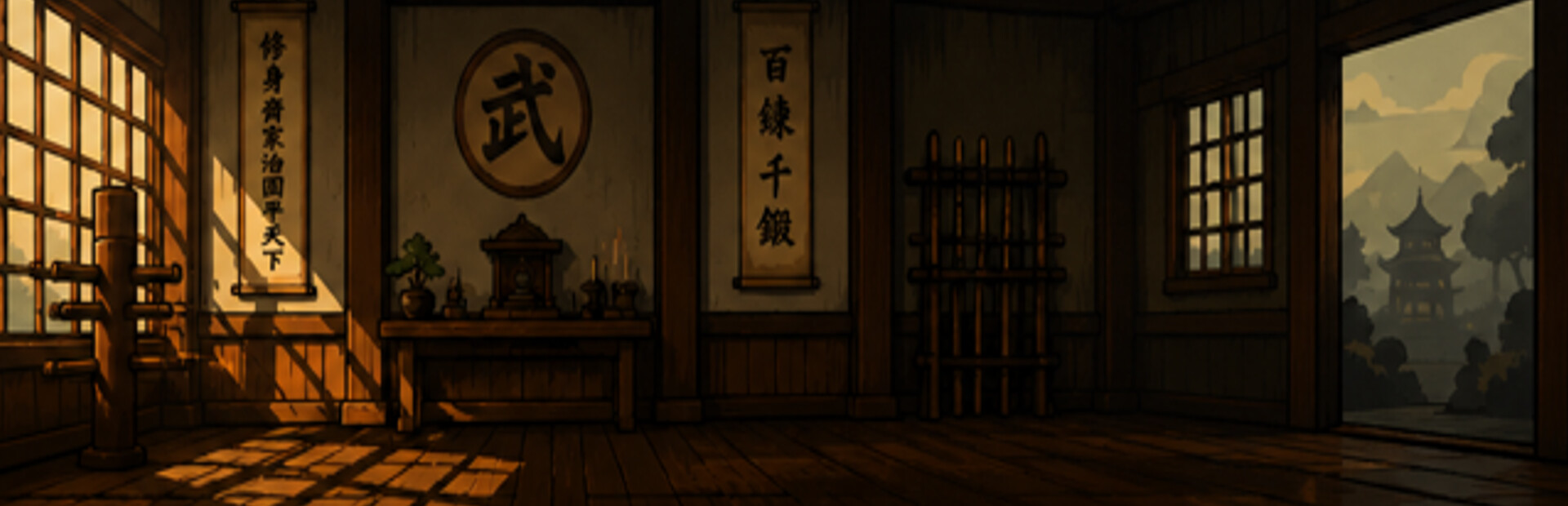
Most people were never truly taught how to type correctly.They learned bad habits, developed weak finger control, and hit a wall they never understood how to break through.Foundation Typer was built to change that.This is not a boring typing program.
This is structured training.Using guided lessons, finger awareness, rhythm development, key rollover concepts, and performance tracking, Foundation Typer helps beginners build a REAL typing foundation from the ground up.Whether you currently type at 10 WPM or 30 WPM, this program is designed to guide dedicated students toward stable, confident typing speeds of 35+ WPM — and far beyond for those willing to train seriously.
TRAIN ACCURACY. TRAIN FLOW. TRAIN DISCIPLINE.
• Step-by-step beginner lessons• Finger-specific training
• Real-time WPM and accuracy tracking
• Problematic key detection
• Practice and custom typing modes
• Graduation challenges and belt progression
• Martial arts inspired motivation system
• A training philosophy focused on flow and control over reckless speed
THIS PROGRAM IS DESIGNED FOR:
• Complete beginners• Self-taught typists with bad habits
• Students
• Gamers
• Competitive typists
• Anyone who wants better keyboard controlYou do not need talent.
You need repetition, consistency, and proper guidance.
THE DOJO DOES NOT REWARD SPEED ALONE.
Accuracy is honor.Flow is control.
Discipline creates mastery.“A calm typist defeats a frantic one.”
— Sifu Key-Ro
BELT PROGRESSION SYSTEM
FROM BEGINNER TO GRANDMASTER
Train your fingers.Sharpen your rhythm.
Reduce hesitation.
Build real typing flow.This is not random button mashing.
This is controlled movement.Keep practicing. Keep improving. Become legendary.
Foundation Typer — game info
- Platforms
- Windows
- Player modes
- Single-player
- PC Game Pass
- Not included
What Steam players say
Recent verbatim reviews from Steam — separate from playze.io community reviews below.
On launch: The spin-up time is very long. Home screen: Fullscreen by default—unclear what "home" is or how to navigate it. Needs a guide. Help system: Currently opens only a YouTube page with 2 videos. Better approach: provide an indexable, text-based guide with links to individual video clips or documentation archive for reference. Steam screenshot tool: Can't use it; strokes won't register. (May be user error, but worth investigating.) UI scaling: Doesn't expand properly on screen. No settings page to adjust. Rating: 7/10. Love the concept. Needs refinement: Add progression rewards—avatar advancement on a 2D path Consider a Slay the Spire–style map structure Integrate roguelike-style rewards into the dojo mode5 found this helpful
This game its very good, it helps people learn how to type better. Sifu is also very funny! Best thing is that its free! but I would pay for it too!2 found this helpful
This is a legit game worth trying. 5/5 stars. ----- If you are looking for a typing game to help improve your typing skills, try this out. I am amateur typing hobbyist and have clocked hours on a different typing game/test. This one is worth trying out because it is educational and tests practical keyboard movements. I was surprised at the information it teaches and then tests on. I want more from this creator and this game and I am completely happy with what I learned from the game. If more content is added, I will be back playing it. To the developer/creator, I typed this review after getting the orange belt on my 2nd playthrough. You are awesome. Thank you, thank you, thank you. [If you are curious about the character/mascot, he is there to be placebic company to enhance your attachment and enjoyment of the game. Si Fu is the a Microsoft "Clippy", paper clip guy, thing. Lwk annoying but I muted him and focused on typing]1 found this helpful
huge1 found this helpful
In rhythm and flow you can easily master your typing skill to perfection if you are really into that learning.
Foundation Typer is a simple typing game that focuses on improving speed, accuracy, and keyboard skills. Instead of adding complicated mechanics, the game keeps its purpose clear: type correctly, improve your performance, and challenge yourself to become faster. The biggest strength of Foundation Typer is its accessibility. Anyone can understand the basic idea immediately, and the game provides an easy way to practise typing without needing extra setup. For beginners who want to build confidence with their keyboard skills, this straightforward approach works well. The gameplay loop is simple but effective. Seeing your words-per-minute score improve and making fewer mistakes can be satisfying, especially for players who enjoy tracking personal improvement. The focus on measurable progress gives the game a clear purpose. The clean design also helps. Since typing is the main focus, avoiding unnecessary distractions makes sense. The game keeps attention on the task rather than filling the screen with extra features that do not add much value. However, the biggest problem is that typing games are naturally limited. Once you understand the mechanics, there is not much variety beyond …
Community reviews
0 reviews
Sign in to write a review.
No reviews yet. Be the first to review this game.
More like Foundation Typer


News
 Xbox
XboxMinecraft Dungeons 2 Deluxe Edition: skip it, play on Game Pass
The Minecraft Dungeons 2 Deluxe Edition asks you to pre-order two unannounced DLC packs for a game Game Pass already gives you. What it contains, and why the upgrade can wait.
Sep 30, 2026 PC
PCIs DayZ worth it? A straight answer before you buy
Is DayZ worth it? Twelve years on it is still the genre's least forgiving game. What you are buying, who it suits, and what our 97-day price record says about the timing.
Sep 30, 2026 PC
PCTransport Fever 3 price: which edition to buy on launch day
Transport Fever 3 is out today. The Transport Fever 3 price splits three ways, the loyalty discount has a fortnight-long fuse, and our record shows what the older game really costs.
Sep 29, 2026 PC
PCNo Man's Sky price: how low it gets and when to buy
The No Man's Sky price has come a long way down since 2016, and the game is on PC Game Pass too. Our tracked 12-month low, the regional key gap, and what to actually pay.
Sep 29, 2026 Deals
DealsSekiro cheap: what our price record shows, and what to avoid
Search Sekiro cheap and the results are keyshop listings, not a store discount. Our three-month price record explains the gap, and why so few live offers changes the advice.
Sep 28, 2026 Freebies
System Shock 2 Remaster free on Epic from 1 October
System Shock 2 Remaster free on Epic from 1 to 8 October, alongside BURIED STARS. Our price record shows why its floor has not moved in three months, and why waiting beats buying this week.
Sep 28, 2026 PC
PCDead Island 2 cheap: which edition, and what the price does
Dead Island 2 cheap used to mean under a dollar. Our price record shows the floor has roughly doubled since September - here is which edition to buy, and the one that is a trap.
Sep 27, 2026 Deals
DealsSteam Autumn Sale 2026: the games that cannot be discounted
The Steam Autumn Sale 2026 runs 1-8 October, but Valve's own rules bar every September release from it. Which games are locked out, and what our record says about the two biggest.
Sep 27, 2026 PC
PCTekken 8 ღირს თუ არა: 91 ქულა და შერეული შეფასება
Tekken 8 ღირს თუ არა, როცა კრიტიკოსებს 91 ქულა აქვთ დაწერილი, მოთამაშეებს კი „შერეული"? ფასი, ონლაინის მდგომარეობა და უკეთესი ალტერნატივა.
Sep 24, 2026 Deals
DealsStellaris იაფად: ოცდახუთი დამატება და ერთი გამოსავალი
Stellaris იაფად ყიდვა საბაზისო თამაშის შემთხვევაში მარტივია. ძვირი დამატებებია — და მათთვის არსებობს ვარიანტი, რომელსაც ბევრი ვერ ამჩნევს.
Sep 24, 2026 PC
PCARK ფასი: Evolved თუ Ascended — რომელი ვიყიდოთ
ARK ფასი ორი სხვადასხვა თამაშის ფასია. რომელი ჯობია ქართული სიიდან, სად არიან მოთამაშეები და რატომ არ ღირს ახალ ვერსიაზე გადახტომა.
Sep 24, 2026 Deals
DealsCivilization 6 იაფად: რომელი დამატება ღირს მართლა
Civilization 6 იაფად ყიდვა მარტივია — საბაზისო თამაში იაფია და იაფად რჩება. რთული ის არის, რომ ცხრამეტი დამატებიდან სწორი აირჩიოთ.
Sep 24, 2026 Freebies
CS2 უფასოდ: რა ღირს სინამდვილეში Prime
CS2 უფასოდ ითამაშება საქართველოდანაც და ეს დემო არაა. ფული მხოლოდ Prime-ს სჭირდება — აი, რას იძლევა ის და ვის ღირს.
Sep 24, 2026 PC
PCCuphead ღირს თუ არა: სირთულე, DLC და ორზე თამაში
Cuphead ღირს თუ არა: ექვსივე ქართულ მაღაზიაში ერთი ფასია, მეგობარს კი ასლი საერთოდ არ სჭირდება. სირთულე, ერთადერთი დამატება და როდის ვიყიდოთ.
Sep 23, 2026 Deals
DealsRimWorld იაფად: ბაზა, ხუთი დამატება და სწორი რიგი
RimWorld იაფად ყიდვა დამატებების რიგზეა დამოკიდებული, არა ფასდაკლების ლოდინზე. რომელი ხუთიდან ღირს ჯერ და რომელ მაღაზიას აქვს ფასდაკლება.
Sep 23, 2026 PC
PCPhasmophobia ფასი: ოთხი ასლი და ერთი მაღაზია
Phasmophobia ფასი ქართულ სიაში მხოლოდ ერთ მაღაზიაში ჩანს, თამაში კი ოთხზეა გათვლილი. რატომ ღირს ფასდაკლების დალოდება და რა გჭირდებათ დასაწყებად.
Sep 23, 2026Top games right now
All rankings →- 1Counter-Strike 2Free
- 2Dota 2Free
- 3PUBG: BATTLEGROUNDSFree
- 4Grand Theft Auto V Legacy—
- 5Terraria$2.20
- 6Rust$25.98
- 7Team Fortress 2Free
- 8Black Myth: Wukong$35.70
- 9HELLDIVERS™ 2$30.94
- 10ELDEN RING$52.89
- 11Apex Legends™Free
- 12Left 4 Dead 2$9.99
- 13Stardew Valley$14.73
- 14Wallpaper Engine$3.99
- 15Euro Truck Simulator 2$4.99
- 16Dead by Daylight$10.40
- 17Red Dead Redemption 2$10.54
- 18Baldur's Gate 3$41.99
- 19Phasmophobia$18.29
- 20War ThunderFree
- 21Call of Duty®—
- 22ARK: Survival Evolved$14.24
- 23Among Us$3.03
- 24The Forest$19.99