
KUMAMAWASHI
Sologram Co.,Ltd. · November 26, 2024 · Action, Puzzle, 3D Platformer, Exploration, 3D
Buy KUMAMAWASHI from Steam at $1.99 — the cheapest of 1 store we compare.
 Buy at Steam
Where to buy KUMAMAWASHI — official stores
KUMAMAWASHI price by region
KUMAMAWASHI costs $1.04 in Georgia (USD), £1.69 in the United Kingdom, $1.99 in the United States, €1.99 in Europe (EUR), CA$2.59 in Canada, A$2.95 in Australia, NZ$2.99 in New Zealand, R$6.99 in Brazil and zł8.99 in Poland right now.
| Region | Best price | Official store | Key shop | Stores |
|---|---|---|---|---|
 Georgia (USD) | $1.04 −25% | $1.04 | — | 1 |
 United Kingdom | £1.69 | £1.69 | — | 1 |
 United Statesyour region | $1.99 | $1.99 | — | 1 |
 Europe (EUR) | €1.99 | €1.99 | — | 1 |
 Canada | CA$2.59 | CA$2.59 | — | 1 |
 Australia | A$2.95 | A$2.95 | — | 1 |
 New Zealand | NZ$2.99 | NZ$2.99 | — | 1 |
 Brazil | R$6.99 | R$6.99 | — | 1 |
 Poland | zł8.99 | zł8.99 | — | 1 |
Each row is a real price from that region's own stores, not a currency conversion, so the figures are not directly comparable. Switch regions in the header to shop the one you buy in.
Screenshots
About KUMAMAWASHI
Story:
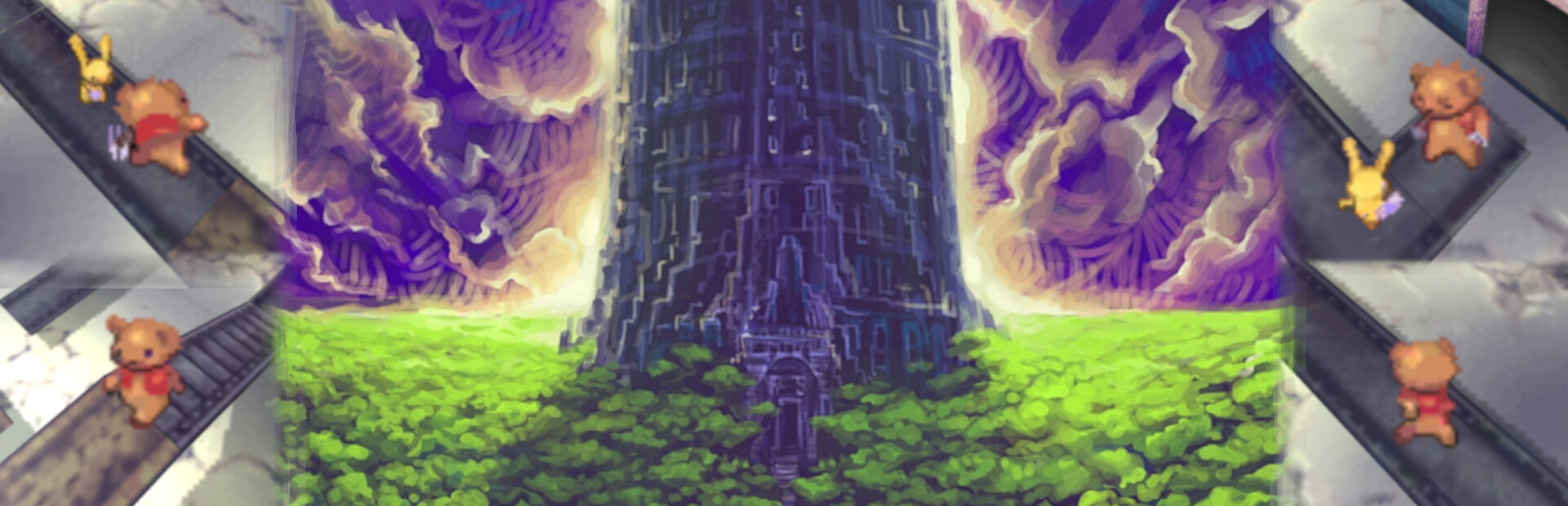
"The witch... took her."To rescue the kidnapped girl, the bear embarks on a solo journey, delving into the depths of the witch's tower.Game Overview:
Rotate the panels to forge a path and lead the bear to the girl.Move the cursor forward, backward, left, right, and up or down to select and rotate panels, creating paths for the bear.The bear's stamina decreases over time, and when it reaches zero, it's game over.Stamina can be restored by touching orbs scattered throughout the tower, allowing the bear to explore further.The tower to be explored is wide, tall, and consists of stages with a sense of volume. With adjustable difficulty settings, you can enjoy puzzle action suited to your skill level.Key Operations:
\- Keyboard … Tab key
- Gamepad … Menu button, View button, Y button
- Keyboard … WASD keys
- Gamepad … D-pad, Left stick
- Keyboard … Up/Down arrow keys, Numpad keys 5 and 2
- Gamepad … RB, LB buttons, Right stick (up/down)
- Keyboard … Space key, Enter key
- Gamepad … A button
- Keyboard … Left/Right arrow keys, Numpad keys 1 and 3
- Gamepad … LT, RT buttons, Right stick (left/right)
- Keyboard … Ctrl key, Numpad key 0
- Gamepad … X button
- Keyboard … Space key, Enter key
- Gamepad … A button
- Keyboard … Space key, Enter key
- Gamepad … A button
- Keyboard … ESC key, Ctrl key, Tab key, Numpad key 0
- Gamepad … B button, Menu button, View button, X button, Y button
- Keyboard … WASD keys, Arrow keys
- Gamepad … D-pad, Left stick
- Keyboard … Space key, Enter key
- Gamepad … A button
- Keyboard … ESC key
- Gamepad … B button
Gameplay Details:
Cursor Movement: Use the WASD keys or D-pad to move the yellow cursor up, down, left, and right.To rotate the panel under the cursor, press the Space key, Enter key, or A button, which will turn it 90 degrees counterclockwise.Rotate the panels to create a path and guide the bear deeper into the tower.However, some panels cannot be rotated, so please judge by their appearance.Also, if you hold down the rotation key after rotating a panel, you can continue to rotate it as long as the key is held down.Vertical Cursor Movement: The room has level differences equivalent to the height of one floor.The panel to be rotated is directly beneath the cursor, so to select a panel positioned above the cursor, you need to raise the cursor's position.You can raise the cursor with the up arrow key, numeric keypad 5, or the RB button, and lower it with the down arrow key, numeric keypad 2, or the LB button.Raising the cursor's position not only changes the selected floor, but also allows you to have a broader view inside the room.By the way, even when walking on a sloped panel, the time it takes to traverse is the same as walking on a flat panel.Camera Control: In some places, it may be difficult to see the bear's position.In such cases, it's good to rotate the camera.You can rotate the camera using the left and right arrow keys, numeric keypad 1 and 3 keys, or the LT and RT buttons.You can check which direction the camera is facing using the compass display in the bottom right of the screen.Stamina and Orbs: In the center of the upper part of the screen, there is a red bar that represents the bear's stamina.The bear's stamina constantly decreases over time while moving.If the stamina runs out, it's game over.If you stop at the edge of a panel with no path ahead, stamina decreases at twice the normal rate.Always keep an eye on your stamina and try to advance the bear on the shortest route without stopping.Whether the stamina is currently decreasing is shown in real-time on the icon at the top left of the screen.The rate of decrease is also displayed on this icon.This icon allows you to check whether the bear is stopping even when it's off-screen and not visible.Touching a Orb before the stamina runs out will fully restore it.Therefore, you will progress the bear through the tower by passing through Orbs scattered throughout.You can also save at Orbs, so it's good to save first when you reach a Orb.Leave the Orb: When leaving the Orb, you can choose the direction to proceed.Use the WASD keys or the D-pad to select a direction, and confirm with the Space key, Enter key, or A button.Surrender: If you lead the bear to a dead end, choose to surrender from the menu.If you have touched a Orb before, you can restart from the last Orb you touched.You can access the menu by pressing the Tab key or the menu button.Combat: When you come into contact with an enemy, you will enter combat.Each time you are hit by an enemy attack, your stamina decreases significantly, so you need to defeat the enemy as quickly as possible.To attack with the bear, hold down the Space key, Enter key, or A button to charge power, and release it at the desired moment.The more power you charge, the more damage you deal in a single hit.However, if you miss the timing, you will inflict less damage than expected.During combat, the enemy's stamina bar is displayed below your own.At the same time, a gauge showing the damage you can deal with the charged power is displayed above the bar.Use this to time your attacks.Also, power can be charged up to 8 levels. Charging beyond this level will not increase the power beyond the 8th level.Dashing: Press the Ctrl key, numeric keypad 0, or the X button to make the bear dash, doubling its movement speed.It's good to dash when you have mostly created the path.Pressing the key again returns the bear to normal speed.When dashing, the bear's stamina also depletes at twice the normal rate.This means the distance you can travel with the same stamina is the same as when moving at normal speed.However, if you stop at the edge of a panel while dashing, stamina depletes at four times the normal rate.It's better not to dash recklessly when the path is not yet made.Note that dashing only affects movement.Entering combat while dashing will not change anything compared to entering combat at normal speed.Menu and Tower Map: You can view the tower's map from the menu.You can access the menu by pressing the Tab key or the menu button.By carefully examining the tower's map, you can figure out the route to the next Orb or destination.If you're unsure of which direction to go, it's a good idea to check the tower's map.Also, when touching a Orb, you can move the bear to any previously touched Orb using the tower's map.If you realize you've missed something, it's convenient to move to the Orb closest to your destination from the tower's map screen.Bear's Abilities: You can adjust the bear's power when touching the Orb.If you find yourself unable to proceed, it's best to unlock the latent abilities first.Unlocking latent abilities will increase both attack power and movement speed.Increased attack power means more damage to enemies during combat, and increased speed allows you to travel farther with the same amount of stamina.You can check where to unlock latent abilities on the tower map.Retry from Entrances: You can go to adjacent rooms from the entrance.When you switch rooms, the panels in the previous room return to their initial rotation state, and enemies respawn.Furthermore, after leaving the Orb, the first time you reach an entrance, you will be able to restart from the room's entrance in case of a game over or surrender.If you find it difficult to navigate the bear in a room and lose more stamina than expected, it may be better to surrender before moving to the next room and restart from that room's entrance.However, please note that the number of restarts from the room's entrance is limited, unlike restarting from the Orb.The number of restarts can be reset by touching a Orb.Difficulty Settings: If you find the game very difficult or get stuck and can't progress after multiple attempts, try changing the bear's stamina to 'High' from the menu settings.Increasing the stamina can help cover for some operational errors.Normally, you can progress through the game with the usual amount of stamina, so it's recommended to temporarily change the setting only when you absolutely can't move forward.Also, if you're confident in your skills, choosing 'Limited' will make the difficulty more challenging.KUMAMAWASHI — game info
- Platforms
- Windows
- Player modes
- Single-player
- Controller
- Partial controller support
- PC Game Pass
- Not included
What Steam players say
Recent verbatim reviews from Steam — separate from playze.io community reviews below.
This was a strange, horrific experience. Kumamawashi looks like an innocuous children's game but is full of sinister level designs and elements that are just downright broken and got me soft locked several times, taking me probably 15 hours to finally complete. Yet something compelled me to keep playing it, perhaps a combination of the nostalgic graphics and music and addictively simple puzzle element designed to lure you in and then enrage you not unlike the bear you play as in the story. A girl offers a bear an apple in the woods before being kidnapped by a witch and he must go through fifty floors of twisting, rotating platforms to save her. If you decide to play this game, note two things: 1. Set the stamina in the options to max, the game considers this "easy" but it's actually the only way some areas can be completed. 2. Make sure you collect every power up on each level of the tower before you proceed to the next floor. If you do this then the game will still be extremely frustrating but playable. You basically just rotate the floor pieces as the bear moves and try to guide him to the exit, but as you progress the game starts having branching paths and giving poweru…3 found this helpful
Community reviews
0 reviews
Sign in to write a review.
No reviews yet. Be the first to review this game.
More like KUMAMAWASHI


News
 PC
Games like NieR Automata when one ending is not the end
Games like NieR Automata for the reason it sticks: a story that rearranges itself when you play it again, and combat sharp enough to carry the repeat.
Nov 23, 2026 PC
Games like Metro Exodus when the train has to keep moving
Games like Metro Exodus for the part that sticks: a long road through country that lets you off the rails, and a rifle you have to keep clean.
Nov 23, 2026 PC
Starfield Premium Edition: what the upgrade is worth now
The Starfield Premium Edition now bundles two real expansions, and our record puts it 43% above the plain game. Which route to take, and the two listings to walk past.
Nov 23, 2026 PlayStation
Spider-Man Remastered price: which Spider-Man to buy on PC
The Spider-Man Remastered price had not moved in seven weeks until Sony's PC sale opened. What our record says about all three Spider-Man games, and which one is the buy.
Nov 23, 2026 PC
Games like Vampire Survivors when the weapons fire themselves
Games like Vampire Survivors for the thing it actually does: upgrades that compound into each other while you spend half an hour deciding what to stack next.
Nov 22, 2026 PC
Games like Terraria when the boss ladder runs out
Games like Terraria for the part people actually miss: a world you dig through, and a boss that will not let you past until your gear has caught up.
Nov 22, 2026 Deals
Euro Truck Simulator 2 price: Steam's number one, 14 years on
Euro Truck Simulator 2 price: the base game topped Steam for the week of 10-17 November. Our record holds 25 readings since 26 September, and only three of them are low.
Nov 22, 2026 PC
Games like Sayonara Wild Hearts when the song is the level
Games like Sayonara Wild Hearts, from the arcade shooter this whole idea descends from to the ones that just play a great soundtrack while you ride.
Nov 21, 2026 Blog
GTA 6 გამოვიდა: როდის იხსნება, რამდენია ჩამოსატვირთი და რა ხდება PC-ზე
GTA 6 PS5-სა და Xbox Series X|S-ზე 19 ნოემბერს, ადგილობრივი შუაღამისას იხსნება, თბილისში 00:00-ზე. გახსნის დრო, 212 GB ჩამოტვირთვა და რისი ყიდვა შეიძლება PC-ზე.
Nov 18, 2026 Blog
SilkMU ჩვენი ახალი პარტნიორია: MU Online Season 6 პირდაპირ ბრაუზერში
SilkMU, MU Online-ის Season 6 სერვერი, რომელიც ბრაუზერში ან აპლიკაციად თამაშდება, 6 ნოემბერს გაიხსნა და ახლა playze-ის პარტნიორია. რას გთავაზობს, რა არის უფასო და რა ღირს WCoin.
Nov 13, 2026 PC
Tekken 8 ღირს თუ არა: 91 ქულა და შერეული შეფასება
Tekken 8 ღირს თუ არა, როცა კრიტიკოსებს 91 ქულა აქვთ დაწერილი, მოთამაშეებს კი „შერეული"? ფასი, ონლაინის მდგომარეობა და უკეთესი ალტერნატივა.
Sep 24, 2026 Deals
Stellaris იაფად: ოცდახუთი დამატება და ერთი გამოსავალი
Stellaris იაფად ყიდვა საბაზისო თამაშის შემთხვევაში მარტივია. ძვირი დამატებებია — და მათთვის არსებობს ვარიანტი, რომელსაც ბევრი ვერ ამჩნევს.
Sep 24, 2026 PC
ARK ფასი: Evolved თუ Ascended — რომელი ვიყიდოთ
ARK ფასი ორი სხვადასხვა თამაშის ფასია. რომელი ჯობია ქართული სიიდან, სად არიან მოთამაშეები და რატომ არ ღირს ახალ ვერსიაზე გადახტომა.
Sep 24, 2026 Deals
Civilization 6 იაფად: რომელი დამატება ღირს მართლა
Civilization 6 იაფად ყიდვა მარტივია — საბაზისო თამაში იაფია და იაფად რჩება. რთული ის არის, რომ ცხრამეტი დამატებიდან სწორი აირჩიოთ.
Sep 24, 2026 Freebies
CS2 უფასოდ: რა ღირს სინამდვილეში Prime
CS2 უფასოდ ითამაშება საქართველოდანაც და ეს დემო არაა. ფული მხოლოდ Prime-ს სჭირდება — აი, რას იძლევა ის და ვის ღირს.
Sep 24, 2026 PC
Cuphead ღირს თუ არა: სირთულე, DLC და ორზე თამაში
Cuphead ღირს თუ არა: ექვსივე ქართულ მაღაზიაში ერთი ფასია, მეგობარს კი ასლი საერთოდ არ სჭირდება. სირთულე, ერთადერთი დამატება და როდის ვიყიდოთ.
Sep 23, 2026New releases
All new releases →- ACE COMBAT 8: WINGS OF THEVEOct 1, 2026$57.14
- AION 2Sep 30, 2026Free
- Onimusha: Way of the SwordSep 25, 2026$39.57
- CONTROL ResonantSep 24, 2026$35.07
- AniimoSep 16, 2026Free
- WARDOGSSep 10, 2026$26.79
- The Blood of DawnwalkerSep 2, 2026$47.59
- STAR WARS Zero Company™Aug 27, 2026$36.26
- The Sinking City 2Aug 18, 2026$34.99
- Corsair CoveJul 31, 2026$20.76
- PathogenicJul 16, 2026$4.27
- EterspireJun 4, 2026Free
- Schrödinger's CallMay 27, 2026$17.99
- Birdwatching NotebookMay 26, 2026$8.49
- Realm of InkMay 26, 2026$18.16
- Directive 8020May 12, 2026$37.85
- Better Than DeadMay 12, 2026$11.99
- Eden CraftersMay 7, 2026$6.91
- Demons' TimelineApr 29, 2026$9.83
- iRacing ArcadeMar 3, 2026$24.99
- HorripilantFeb 20, 2026$4.33
- KLETKAFeb 19, 2026$8.28
- REANIMALFeb 13, 2026$20.22
- The QuinfallFeb 6, 2026$9.99
Top games right now
All rankings →- 1Counter-Strike 2Free
- 2Dota 2Free
- 3PUBG: BATTLEGROUNDSFree
- 4Grand Theft Auto V Legacy—
- 5Terraria$2.25
- 6Tom Clancy's Rainbow Six SiegeFree
- 7Rust$24.94
- 8Garry's Mod$6.19
- 9Team Fortress 2Free
- 10Black Myth: Wukong$35.10
- 11HELLDIVERS™ 2$23.89
- 12ELDEN RING$38.88
- 13Apex Legends™Free
- 14Left 4 Dead 2$9.99
- 15Stardew Valley$9.66
- 16Wallpaper Engine$3.79
- 17Cyberpunk 2077$17.99
- 18Euro Truck Simulator 2$4.99
- 19Dead by Daylight$6.91
- 20Red Dead Redemption 2$13.95
- 21The Witcher 3: Wild Hunt$9.77
- 22Baldur's Gate 3$41.99
- 23Phasmophobia$19.99
- 24War ThunderFree